Review: Sanyo’s USB Powered NiMH Charger
December 16, 2007
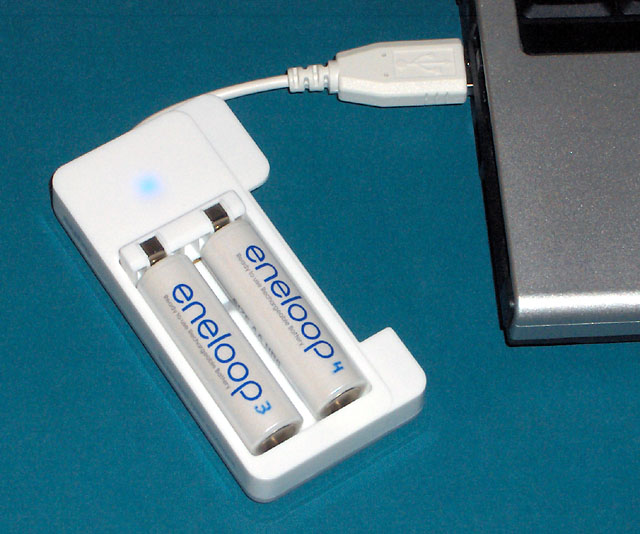
Sanyo’s USB powered charger can charge one or two AA or AAA rechargeable batteries from your computer’s USB port.
Just over a year ago, I wrote and posted an article describing how to build a USB powered AA battery charger. At that time I needed such a thing, and none of the commercially available solutions were satisfactory. When I later reviewed Sanyo’s Eneloop rechargeable batteries, I caught the attention of a senior Sanyo Europe executive who, in addition to providing some feedback, informed me that Sanyo was about to release a USB powered charger that had none of the shortcomings of the other such devices available. He offered to send me one, and I gladly accepted.
Why Would You Need a USB Powered Battery Charger?
The main advantage of charging your batteries from a USB port is portability. When I go on a trip, I bring a lot of gadgets: digital camera(s), PDA, cell phone, GPS, and laptop. I used to bring along AC powered chargers for all of these, which really filled up the carry-on luggage with heavy and bulky items.
Over time, I’ve made and/or purchased charging cables so I can charge all of these items from my laptop’s USB ports. All these cables are either retractable or very short, and thus take up very little space. I’ve also built a USB powered charger for the AA NiMH batteries in my GPS, but I’ve never taken it anywhere by air because I’m leary about taking a home-made gadget through security. Now Sanyo has come to the rescue, and the only AC adapter I need to bring is the one for the laptop itself.
Clearly, charging from your laptop’s USB port should only be done when the laptop is plugged in. If the laptop is running on batteries, you’re just draining one battery (the laptop’s) while charging another.
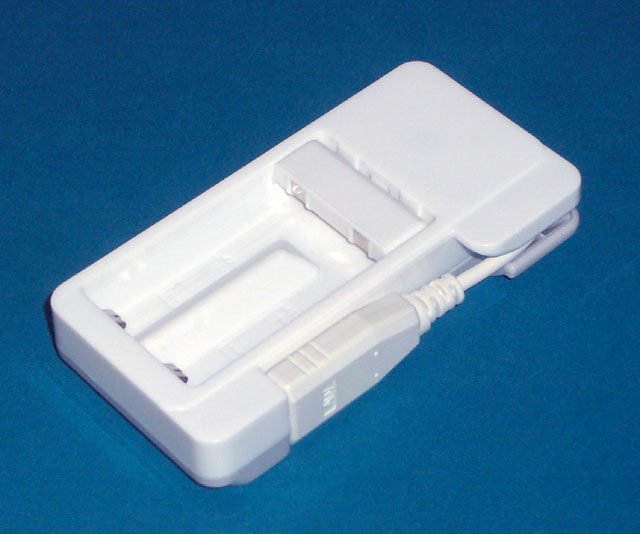
When not in use, the charger folds up into a very compact package.
The Sanyo USB AA Charger
Sanyo’s new charger measures approximately 3.7" × 1.9" × 0.7" and weighs maybe an ounce or two. It has a short (4 inch) USB cable which stores neatly in the side of the charger when not in use. It can charge either one or two AA or AAA Sanyo Eneloop cells at the same time (it can also be used with regular NiMH cells).
To use the charger, just plug it into any available USB port and insert one or two AA or AAA rechargeable batteries. Since AAA cells are shorter than AAs, the positive end of the battery compartment contains a flip-up connector. Flipped up, the compartment is long enough for AAs; flipped down, it fits AAAs. The polarity is marked in the battery compartment, and if you try to put the cells in the wrong way around, they simply won’t fit.
Once the cells are inserted, an internal blue LED will start to blink to indicate that charging is in progress. When charging is complete, the LED stops blinking and stays on continuously.
Charging time depends on the state of charge the cells had when you put them in, their overall capacity, and whether you are charging one cell or two. The following table gives the estimated charge time for fully discharged cells:
| Cell Type | One Cell | Two Cells |
|---|---|---|
| 800mAh NiMH | 1.0h | 1.8h |
| 2000mAh NiMH | 2.5h | 4.5h |
| 2700mAh NiMH | 3.3h | 6.2h |
The charger uses a charging rate of 850mA when charging a single cell and 450mA when charging two at the same time. If you are aware of the 500mA limit imposed by the USB standard, you might be surprised at the 850mA charging rate, but fear not. The charger never draws more than 500mA from the USB port. It uses a very efficient power conversion circuit to convert the 5V DC input to a lower voltage at a higher current, much like a transformer can do with AC power.
Charge termination appears to be done by detecting the voltage peak (rise and fall) that is characteristic of NiMH and NiCd batteries when they reach full charge.
This charger isn’t as fast as some AC powered ones, but I haven’t found that to be a problem. It can easily fully charge two AA cells overnight. If you need to charge more, you could purchase two chargers and run them from two separate USB ports.
How Does It Compare with My DIY Charger?
The Sanyo USB powered charger has several advantages over my home-made one:
- It can charge both AA and AAA cells.
- It can charge either one or two cells at once.
- It uses peak detection, and thus is easier on the cells, since they don’t have to get warm before the charger shuts off.
- It automatically detects cells inserted backwards, or attempts to charge non-rechargeable cells.
- It can simultaneously charge two cells of different capacity or different state of discharge. If one cell finishes first, the charger stops charging it and continues to charge the other.
- Being a commercial product, it is not likely to cause you grief while going through airport security.
Important: If you’ve built my home-made charger, take note that the orientation of the two cells in Sanyo’s charger is different. In my charger, the cells point in opposite directions, whereas in Sanyo’s charger they both point the same way.
Where to Buy It
In the USA, this charger is available from Amazon.com. Unfortunately, it is not yet available in Canada, and Amazon.com won’t ship it to Canada (The Source by Circuit City carries the rest of the Sanyo Eneloop line, but when I enquired about this charger, they had no idea what I was talking about). Here’s the link to Amazon.com:
For purchase in Europe, please see the Sanyo Component Europe web site.


Related Articles
If you've found this article useful, you may also be interested in:
- Tenergy Centura Low Self-Discharge Rechargeable 9V Battery
- Pre-Charged (Low Self-Discharge) Rechargeable Battery Comparison
- Choosing and Using Nickel-Metal-Hydride (NiMH) Rechargeable Batteries
- Testing Sanyo’s Eneloop Low Self-Discharge Rechargeable Battery

If you've found this article useful, consider leaving a donation in Stefan's memory to help support stefanv.com
Disclaimer: Although every effort has been made to ensure accuracy and reliability, the information on this web page is presented without warranty of any kind, and Stefan Vorkoetter assumes no liability for direct or consequential damages caused by its use. It is up to you, the reader, to determine the suitability of, and assume responsibility for, the use of this information. Links to Amazon.com merchandise are provided in association with Amazon.com. Links to eBay searches are provided in association with the eBay partner network.
Copyright: All materials on this web site, including the text, images, and mark-up, are Copyright © 2026 by Stefan Vorkoetter unless otherwise noted. All rights reserved. Unauthorized duplication prohibited. You may link to this site or pages within it, but you may not link directly to images on this site, and you may not copy any material from this site to another web site or other publication without express written permission. You may make copies for your own personal use.
Jeremiah
June 15, 2008
Thanks for the review. I’ve been looking for the best battery solution for Xbox 360 controllers, and the Eneloops with the USB charger might be the trick. The Xbox has two USB ports right on the front. Cheaper than Microsoft’s battery pack, and I can use the AAs in other stuff.
bernard
August 17, 2008
Can I leave my batteries for storage in the charger after charging?
Jerome L.
May 30, 2009
Hi Stefan!
Thanks for your great site and very useful reviews/articles!
I’ve just bought a Sanyo USB charger to connect it to my portable solar pannel of 6 watts. I’m planning a kayak expedition to Greenland so this charger could be very useful! I’m looking forward to test the system!
PS: I have a PPL too! (Piper Warrior II)!
Best regards
Teik Seong
July 03, 2009
Very useful review!
Do you have a review for the energizer usb charger?
http://www.energizer.com/usbcharger/language/english/download.aspx
Andrew Ostrowski
May 01, 2011
batteries and chargers are available at Black’s Camera store in Calgary and likely in other stores
Joseph Marsh
June 14, 2011
thank you for the information very usefull
Othello Tanjoco
June 22, 2011
This is really cool and insightful review..
fyesilova
April 11, 2012
I have similar product sanyo kbc-e1s, which charges batteries and can charge usb devices using aa batteries. This device has some slight smell when used about 2-3 hours. Is this normal for this type of device?
Stefan Vorkoetter
April 11, 2012
Fyesilova, what kind of smell does it have? Something burning?
fyesilova
May 11, 2012
it smells like heated soldering paste.
May be that is normal for this device.
I have charged several eneloops and it works OK.
Batteries are hot during charge.
Nick
May 28, 2012
Thanks, Stefan. I was going to stay away from this because I thought it was a “dumb” charger. If you read here:
http://www.eneloop.info/products/chargers.html
Sanyo does not say this model has any type of microprocessor or control abilities, unlike the MQN09 or MQR06. Your review convinces me that it does in fact stop charging when the battery in each slot is fully charged. Looks like a great little charger!
I need a smart two-bay charger which is very small like this one. (At home, the huge Maha c9000 gives me more control.) However, I may keep looking because I don’t always have my laptop to use the USB connection. Let’s say I was backpacking through some place, traveling light, and wanted to charge at my next destination. Well I could get a USB adapter to plug into the wall, but then I might as well find a charger that does not need a USB connection. Wherever I will be able to plug in a laptop, I will also be able to plug in my charger. This is one line of reasoning. Another is, hey, USB wall adapters are small and cheap so just get one that fits the country’s outlets and connect the Sanyo USB charger. Either way, for complete functionality, I have to do a lot of research. As you know, some chargers and USB adapters can be complete garbage. I’m open to suggestions. Maybe someone knows a charger or USB adapter that would fit the bill.
Stefan Vorkoetter
May 28, 2012
Nick, you could use Sanyo’s 2-cell wall charger, which is what I have at home, but it’s about twice the size of the USB powered one. One nice feature of it though is that the AC prongs fold flat into the back of the charger when not in use.
Alternatively, just get the USB charger, and an Amazon Kindle AC-to-USB adpater (item #B005DOK8NW), which is not much bigger than the plug on a lamp cord, and puts out 5V at 850mA. The two together are smaller than the AC powered charger, and you can use the USB adapter to charge other devices too. Apple’s USB AC adapter would work too, but it costs twice as much.
Nick
May 28, 2012
Hi Stefan. Do I have to worry about matching the output current of the USB adapter to this charger? Sanyo’s website says input current is 500mA (max). Perhaps they are overly cautious. The Apple USB adapter outputs 1 amp! Could this double the output current? Wouldn’t that be bad if only one battery was charging? I found an Apple USB adapter that I like (5V, 1A) because it’s 100-240V, 50-60Hz and you can interchange different types of plugs. The plugs also fit on my laptop’s adapter. I’m afraid the current is too high though.
Stefan Vorkoetter
May 29, 2012
Hi Nick. The adapter will only supply as much current as the device draws. A current rating on an adapter is the maximum it can provide, not the amount it will provide. It’s just like if your municipal water system can supply 100 gallons per minute (current) at 60psi (voltage). If you open your tap half way, you’ll get 50 gallons per minute at 60psi.
Nick
May 30, 2012
Stefan, thanks for clarifying. There was a small voice telling me that but I wouldn’t listen. The specification from Sanyo means that 500mA is the maximum the charger will draw. In that case, I will go with the 2 amp version of the same Apple USB AC adapter because it can provide more current for charging iPads or whatever.
I like your water pressure analogy. I was actually good at electronics at one time before I went college where they made me do integrals day and night. Take care!
Larry
December 04, 2012
Thanks for the review. I’m eager to buy one, but your Amazon link takes me to an AC charger. I did another search and they do have the USB model, but the price seems way too high at $79. http://www.amazon.com/Sanyo-eneloop-Pre-Charged-Rechargeable-Batteries/dp/B004UAG776/ref=sr_1_cc_1?s=aps&ie=UTF8&qid=1354641274&sr=1-1-catcorr&keywords=sanyo+usb+charger
Do you know anywhere to buy at a more reasonable price?
Stefan Vorkoetter
December 11, 2012
Larry, it looks like this charger may have been discontinued. You might consider building your own: http://www.stefanv.com/electronics/usb_charger.html
Andreas B.
December 11, 2012
Hello,
Thanks for the comments regarding the USB limit, actually one could even use Powertraveller solar cells to charge the batteries on the go and be more eco-friendly, but it comes at a spicy price. The powermonkey extreme, for example, seems to have an “intelligent” USB exit that adapts itself to the needs of the equipement drawing a charge, therefore @5V output calculates the need of the 500mA the Sanyo USB charger needs, not sure about the duration of a charge though regarding 2 AA together.
Larry, the USB charger you are after is still available here:
http://eu.nkon.nl/sanyo-eneloop-usb-reislader.html
as I reside in Europe, not sure what tax you might have to pay.
Thanks again and all the best!
.a
Andreas B.
December 14, 2012
Follow-up for Larry, as there is one more similar product to the Sanyo USB charger, that I discovered today:
http://www.picstop.co.uk/powertraveller-powerchimp-portable-charger-grey#.UMr4V3OLJnc
cheers.
.a
Stefan Vorkoetter
December 14, 2012
Andreas, that device you linked to looks pretty good. Not only can it be used to charge batteries from a USB port, it can then use those batteries to power/recharge other mobile devices. I wonder if I can get one in for review.
Andreas B.
December 14, 2012
Hi Stefan,
This is the company that makes them:
https://powertraveller.com/
good luck!
.a