Getting the Most from Your Radio Control System
January 23, 1997
My first plane was a Goldberg Gentle Lady, and my first (and only) radio is a JR Max 4 AM. I taught myself to fly with this setup. Highly recommended.
One Radio, Many Planes
About a year after the maiden flight, I wanted to get into electrics, so I bought a Great Planes Spectra. I figured I’d just buy another receiver and three servos. WRONG! I found out that it would be cheaper to buy another transmitter, receiver, and three servos. I didn’t want another transmitter, I didn’t want to spend $200+ to get my new plane into the air, and I didn’t want to ground the Gentle Lady, so I set out to find a solution. The idea came to me when I saw people swapping batteries in and out of their planes at the field (I don’t do this, but that is the subject of another article). What if swapping receivers were as easy swapping batteries, or easier? Here’s what I came up with.
Too Many Cables
The problem with the typical receiver is that there are simply too many cables connected to it. There is a battery lead, two to four servo leads, and worst of all, the antenna. Removing the receiver requires unplugging all the servos and the power, and carefully pulling the antenna out of the plane. Putting it into another plane requires plugging all the servos back in, being careful to get the right servo connected to the right channel, and then fishing the antenna through the plane. Very time consuming and error prone (not to mention hard on the antenna, which is rather delicate for something so important).
The solution came from the computer industry in the form of the 15-pin sub-miniature VGA monitor connector. The actual connector (not the whole big plug you find on the end of most monitor cables) is about 3.1 cm x 1.3 cm x 1.6 cm, and weighs about 3g. They come in male and female, with solder or crimp connections. They used to be available at Radio Shack, but unfortunately are not any more. However, they are available from nearly any electronics supply house (Active Surplus, Active Components, Digi-Key in the US, Electrosonic, etc.). You need one female connector for the receiver, and one male connector for each plane (the female is used on the receiver since it is less prone to damage from being bounced around in your field box).
The rest of this article describes how I applied this idea to my 4 channel JR AM receiver. The same will work for almost any 4 channel receiver, and can be adapted to more channels by sharing one connector pin for more than one servo- or servo+ lead (since they are all wired together inside the receiver anyway).
Modifying the Receiver
Most receivers consist of a single printed circuit board. The servo connectors are usually just a collection of separate pins, soldered into the circuit board at one end, so as to line up appropriately with openings in the receiver case. Carefully remove the receiver from its case, and unsolder these pins one at a time. Use enough heat to melt the solder, but not so much as to weaken the glue that holds the copper traces to the board. The pins should come out easily (the pins will look like they are part of a larger assembly of 3-pins each, but the plastic around the base of the pins will let go of the pin easily when the pin is hot enough to melt the solder). When all the pins are out, use solder wick to clean up all the holes. Wipe the area of the board with some dope thiner to clean up any burnt lacquer or solder resin. You will now have a board with 15 holes instead of 15 pins.
Prepare 14 wires (stranded, 24 gauge). I like to colour code them. If you do too, prepare 5 red wires, 5 black wires, 1 yellow, 1 orange, 1 white, and 1 blue. The wires should be long enough to reach from the holes, through the case (where the servos used to plug in), over the top of the case, and about 1.5 cm past the end of the case that the antenna comes out of. Strip about 1/2 cm of insulation off each end of each wire, tin the wires, and solder them into the holes. Solder the five black wires into the five holes corresponding to where the black servo leads and black power leads connected (brown for JR systems). Solder the five red wires to the holes corresponding to the red servo and power leads. Now solder the remaining four wires to the remaining hole for each servo as follows: throttle yellow, aileron white, elevator orange, and rudder blue. There will be one hole left over, as the power connector only uses two of the three pins (and only two of the three wires if you happen to have a three wire lead from your switch harness).
Measure the length of the antenna from where it exits the receiver to the very end. Mark this permanently on your workbench if you can. You’ll need to know this later for each new plane. Cut off the antenna about 1.5 cm from the receiver, and strip about 1/2 cm of insulation off the part that’s still connected to the receiver. Tin this end.
Feed the 14 wires through the appropriate openings in the case, and reassemble the receiver. Fold the wires over the top of the receiver, so the ends are where the cut-off antenna is.
Connect the 14 wires and the antenna wire to the back side of the female 15-pin connector. This is simpler if you are using the crimp style connectors, as you can crimp the pins onto each wire, and then insert them into the connector later (if you are using the crimp style connectors, solder them as well, using a very small amount of solder since you don’t want to make the pin any fatter). If you use the solder type connector, you have a lot of wires to solder in a small space, so be careful. The wires should be connected to the connector as follows (the view is from the back side of the female connector):
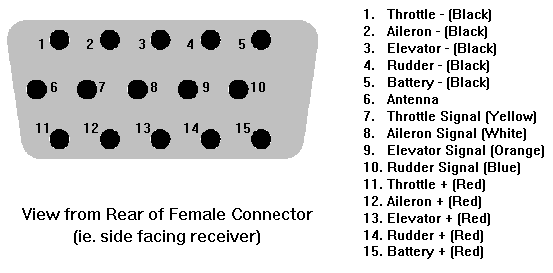
Receiver connector pin-out.
Once the connector is wired up, CA a 1/8" x 1/4" hardwood rail to each side of the receiver. The rails should extend about 1.5 cm past the antenna end of the receiver. CA some 1.5 cm long 1/4" x 1/4" hardwood blocks on the insides of the rails where the protrude past the end of the receiver. Drill holes into the ends of the blocks, and screw the connector to the ends of the rails. The net result should look like this:
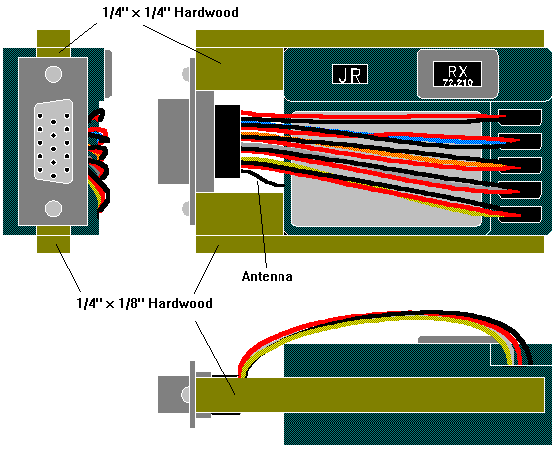
Three-view drawing of the modified receiver.
Wiring the Plane
For each plane, you will need to install a male connector into which the receiver will be plugged. This connector should be installed into a bulkhead, facing forward. I have found that the best place for such a connector in a glider is under the canopy, near the back of the canopy area, at the bottom of the fuselage, angled upwards about 30 degrees. This allows the receiver to be removed easily. The reason to have the receiver facing forwards is so that during a hard launch (I still fly off a hi-start occasionally), the receiver doesn’t slide out.
The first thing to attach to a new male connector is the antenna. Solder or crimp a length of wire to the appropriate pin on the male connector (the one that matches the antenna pin on the female connector). Plug the connector into the receiver, and cut off the wire so that the total length from the receiver is the same as the original antenna length (which you’ve marked on your workbench).
Next, attach the servos. Simply cut the plugs off the end of each servo lead, strip and tin the ends, and solder or crimp them to the appropriate pins on the male connector for the channel you want. Finally, attach the power leads from the switch harness to the appropriate two pins.
If you are using the solder type connectors, you can slide some thin heat-shrink tubing over each wire before you solder it, and then slide it over the connection when you are done. Shrink each row of connections as you complete them.
Check all your connections. Then, check all your connections. Finally, check all your connections. The life of your plane is depending on the fact that none of these connections will fail, so check all your connections.
Plug this newly prepared male plug into the receiver, switch everything on, and see that the correct servos move when you move the sticks. Turn it off, unplug everything, and install the servos and male connector in your plane. Thread the antenna through the fuselage or up to the vertical stabilizer.
Plug the receiver back in, and glue some 1/4" square balsa guide rails into the plane to guide the receiver when it is being plugged in or unplugged. Be careful not to glue the rails to the ones already attached to the receiver. These rails will also support the receiver so that the connector is not the only thing holding it.
Plug and Play
Moving your receiver from plane to plane is now a five second job. Pull it out of one plane, and plug it into another. Try to have your planes set up so the servo directions and travel are appropriate for each plane without having to adjust reversing switches or rates on your transmitter. That way, you’ll never need to worry about making sure your transmitter is set up correctly.
I’ve found that this technique saves a lot of money. When building a new plane, all you need is a new switch ($3), connector ($5), battery ($20), and servos ($20 each). For a 3 channel plane, this amounts to $88. You don’t need a new receiver (over $100) and crystal ($20).
There are only three disadvantages I can think of with this scheme. One is that the receiver is not wrapped in foam. I believe this is not necessary, since the levels of vibration in gliders and electric aircraft are extremely low. And in case of a really severe crash, the receiver will slide out of its socket (the friction alone will absorb some of the impact) instead of coming to a sudden halt. It will hit some part of the inside of the plane with much less force than that of the crash.
The second problem is that this will void any warranty your receiver may have. If you ever send it in for repair, you should send along a male connector with servo sockets wired to it so that the repair centre can test the receiver.
The only other disadvantage is that there is now one more component that you can forget to bring to the field. Of course, failure of the usual range check will immediately remind you that the receiver is not there.


Related Articles
If you've found this article useful, you may also be interested in:
- BattMan II: Computer Controlled Battery Manager
- LED Bargraph Optical Tachometer
- On/Off Motor Controller with Brake
- High Speed NiCd Charger for Electric R/C
- Analog Bar Graph Expanded Scale Voltmeter
- Versatile Miniature High-Rate ESC with BEC and Brake
- Miniature High-Rate Speed Control with Battery Eliminator Circuit (BEC)
- Miniature High-Rate Speed Control with Brake
- Low Cost Thermal Peak Detection NiCd Charger

If you've found this article useful, consider leaving a donation in Stefan's memory to help support stefanv.com
Disclaimer: Although every effort has been made to ensure accuracy and reliability, the information on this web page is presented without warranty of any kind, and Stefan Vorkoetter assumes no liability for direct or consequential damages caused by its use. It is up to you, the reader, to determine the suitability of, and assume responsibility for, the use of this information. Links to Amazon.com merchandise are provided in association with Amazon.com. Links to eBay searches are provided in association with the eBay partner network.
Copyright: All materials on this web site, including the text, images, and mark-up, are Copyright © 2026 by Stefan Vorkoetter unless otherwise noted. All rights reserved. Unauthorized duplication prohibited. You may link to this site or pages within it, but you may not link directly to images on this site, and you may not copy any material from this site to another web site or other publication without express written permission. You may make copies for your own personal use.
Emilio Gianello
June 26, 2008
EXCELLENT IDEA!!!! I’ve had the same old problem, and you pointed a solution that is so simple that I’ve would never figured (maybe because it was always in front of my nose). Thanks for made it public.
(Emilio, from Argentina)
Philip Godfrey
August 22, 2010
Very good idea for the budget minded, but you can actually get 6 channels plus your battery and antenna on a 9 pin connector such as a DB-9 thereby eliminating even more wire from the unit.
Power from the battery and servos share the same traces on the circuit boards – only the signal lines and antenna wire are different.
Using an HD-15 connector such as you suggest, you could use a 12 servos plus the antenna!
Mario
July 05, 2011
You could also use the end connectors of the servos to make the conection to your DB-9 sou you keep the warranty ok !
Its easier to explain the antenna wire cutted than all the rest