Review: HP 35s Programmable Scientific Calculator
October 14, 2007
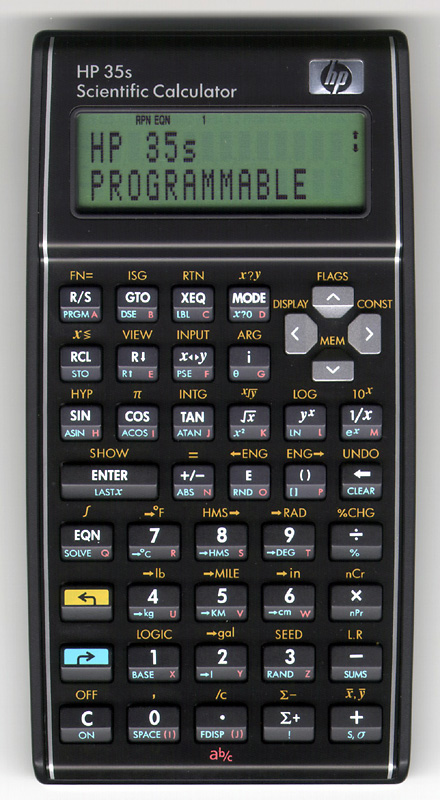
Click for a closer look.
The HP 35s is Hewlett-Packard’s newest (2007) member of their family of non-graphing programmable scientific calculators, and is the first in a long time that looks and feels like an HP calculator should.
Most modern HP scientific calculators fall into two classes: graphing and ugly. The last decent calculator made by HP was the 32sii, an RPN programmable with equation solving and integration. The follow on to this was the 33s, which took a previously nice design and made it into one of the ugliest HP calculators I’ve ever seen.
With the HP 35s, Hewlett-Packard has attempted to return to its roots, at least in appearance and quality. HP produced the 35s as a successor to the 33s, and at the same time as a celebration of the 35th anniversary of the very first scientific pocket calculator ever made, the HP-35.
First Impressions
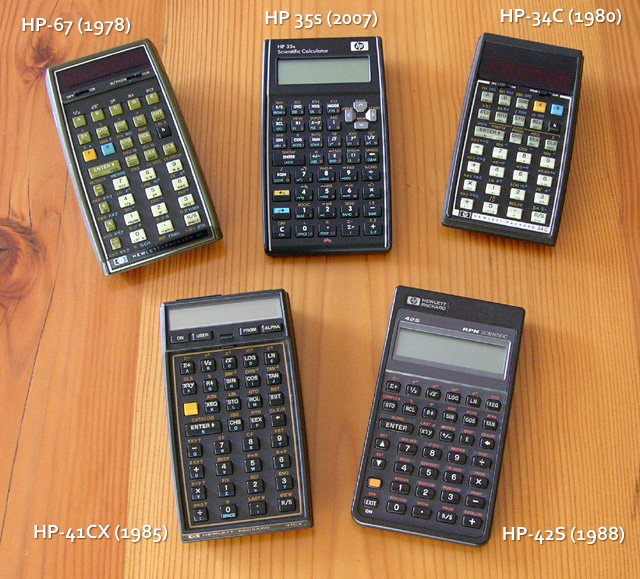
An HP 35s (top centre), with an HP-67, HP-34C, HP-41CX, and HP-42S.
The HP 35s is just slightly larger in width and height than HP’s earlier pocket scientific offerings, but thanks to modern technology, quite a bit thinner. It measures 6¼" × 3¼" × ¾", and weighs only 4½ ounces. The colour scheme is reminiscent of HP’s classic calculators, such as the HP-19C or HP-34C, with a black keyboard bezel, sloped front keys, a double-width ENTER key, gold and blue shift keys, and a silver trim line around the keyboard and display. At the same time, the 35s has a pleasing (to me) modern look to it.
Like most of the older HPs, the 35s is an RPN (Reverse Polish Notation) calculator at heart, although it does have a well-designed algebraic mode for those who prefer this.
Power is provided by a pair of CR-2032 lithium coin cells, wired in parallel through diodes so that they can be replaced one at a time, without danger of losing any programs, equations, or data you have stored in memory,
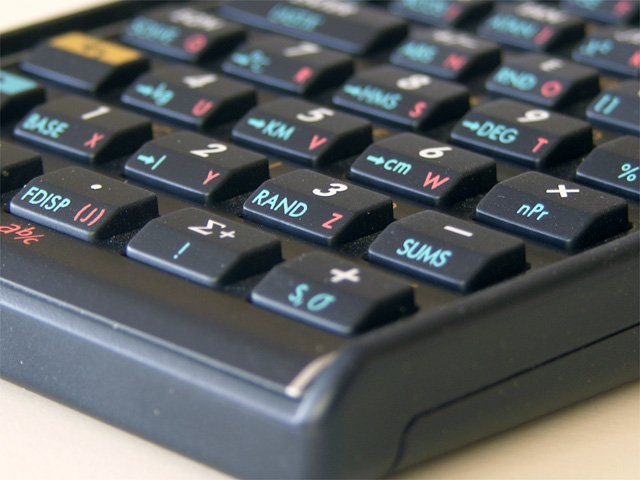
Although not as tall as older HP keys, they have the classic sloped front, and "HP feel" when pressed.
The keyboard layout is quite good, although I have one small nit to pick, which is that the STO function is on a shifted key. As has been the norm with HP calculators for quite a while now, many of the shifted keys open menus of functions rather than having all possible functions assigned to keys of their own. As a result, the calculator has far more functions than a glance at the keyboard might suggest.
I’m happy to report that the keys have that “HP feel” that anyone who has ever used a classic HP calculator can appreciate. The keys aren’t quite as tall nor move quite as far as on the classics, but the feel is there.
Functions
It’s hard to count the number of functions a calculator has, so I won’t even try. Instead, I’ll just enumerate the sort of calculations the 35s can do. Remember also that the 35s is programmable, meaning you can program it to do anything it can’t already do out of the box. I won’t mention any of the programming-specific functions here; those are in their own section.
Most of the basic scientific functions are there, including trigonmetrics and hyperbolics and their inverses, common and natural logarithms and their inverses, squaring and square roots, arbitrary powers and roots, and conversion between degress and radians. What’s missing are conversions between polar and rectangular coordinates (although there is a work-around).
The 35s also has a few built in unit conversions (°F↔°C, lb↔kg, mi↔km, and in↔cm), as well as conversion between hours/minutes/seconds (H.MS) and decimal hours (or degrees). Missing are functions for performing arithmetic directly on H.MS values.
In the statistics area, there are basic statistics on one or two variables (mean, weighted mean, and sample & population standard deviation), as well as linear regression. Also provided are factorial (which can also compute Γ), and functions for computing the number of combinations and permutations of n objects taken r at a time.
The HP 35s’ display can be set to display in fixed point, scientific, or engineering notation. Handy ⇐ENG and ENG⇒ functions shifts the exponent by 3 each time when pressed, making it easy to interpret an answer like 2.345 × 10⁻³ as 2,345 × 10-6.
Vectors and Complex Numbers
In addition to working with real numbers, the HP 35s provides limited support for working with complex numbers, and 1-, 2-, and 3-element vectors of real numbers.
Complex support is limited in the sense that some very basic operations that work fine on other HP calculators like the HP-42S don’t work on the 35s. For example, taking the square root of -2 yields 1.4142i on the 42S, and an error message, “SQRT(NEG)“, on the 35s. Using the yx key with a 0.5 exponent doesn’t work either, unless the -2 is entered as -2i0. In short, the calculator doesn’t automatically switch to complex mode when needed, and even in complex mode, not all operations work (such as √x). Nevertheless, it is possible to perform complex arithmetic once you know how.
Complex numbers can be entered in either rectangular or polar form, using the i and Θ keys respectively. The calculator can be set to display results in either form as well. This is the way to work around the 35s’ lack of polar↔rectangular conversions; enter the coordinates as complex number in one form, and display it in the other. One complaint about the display of polar complex numbers is that the Θ symbol looks almost exactly like the digit 8; they are only different by two pixels.
Vectors are entered using the [] key, which enters a matching pair of square brackets. The elements of the vector (if more than one) are separated by commas (gold-shifted decimal point). Vectors can be added and subtracted, multiplied or divided by a scalar, or multiplied by another vector to yield the dot product. There is no cross product function.
Logic and Other Number Bases
There are two menu keys, BASE and LOGIC, for entering and manipulating numbers in binary, octal, and hexadecimal. The base in which they are displayed is independent of the base in which they are entered, so it is always necessary to add b, o, or h after non-decimal numbers when entering them. However, the calculator must be in hexadecimal display mode to allow entry of the digits A through F (which is done with the six keys in the row above the ENTER key, which have alpha labels H through M). The logic menu contains AND, OR, XOR, NOT, NAND, and NOR functions.
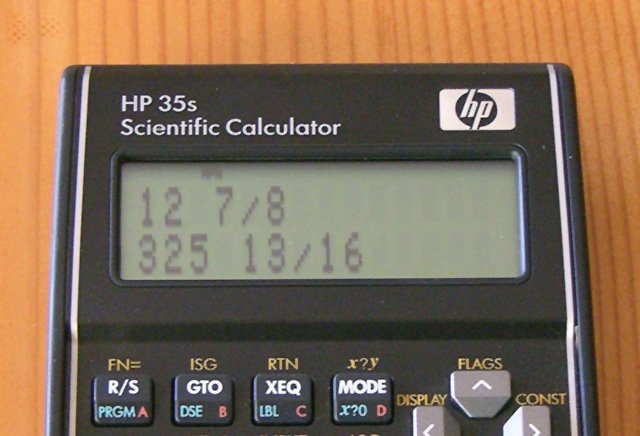
The HP 35s can work in fractions, which I find useful in the workshop.
One feature of the 35s that I really like is its ability to work in fractions, which comes in really handy in the workshop. The calculator can display fractions with denominators up to 4095, and can be set to always choose denominators satisfying certain requirements (for example, a power of 2 when working with inches). Unfortunately, the interface for these special settings is a bit awkward, requiring the setting of flags.
Memories
Virtually every calculator has at least one memory in which to store intermediate values. The HP 35s has twenty six of them, given the names A through Z. To store a value, press blue-shift STO, followed by the key with the desired letter on it. Use RCL and the letter to retrieve the value. All the memories are retained when the calculator is turned off.
In addition to the twenty six named memories, there are 801 numbered memories. To access these, first store the desired number into named memory I or J, and then use STO or RCL together with the (I) or (J) keys. This sounds awkward, and it is, but it is a feature that is invaluable for programming.
Every memory in the HP 35s, both the named and numbered ones, can hold either a single real number, a complex number, or a vector of real numbers.
Equations, Solve, and Integrate
Like its immediate predecessors (HP 33s and 32sii), the HP 35s has an equation mode where equations and formulae can be entered in a one-dimensional algebraic syntax (like in C, Pascal, BASIC, FORTRAN, etc.). Such equations can be used as formulae, in which case the calculator prompts for values of all the variables and then computes the answer (and assigning it to the lone variable on the left hand side of the equals sign, if any).
Alternatively, the equations can be used together with the calculator’s powerful solve and integrate features. In case you’ve been living under a Casio or TI rock, solve and integrate first appeared in the ground breaking HP-34C introduced in 1979. These functions can solve an equation for an unknown variable, or numerically integrate a formula over a specified range. In the HP-34C the equation or formula had to be expressed as a program, but in later calculators such as the 35s, it can be written in the above-mentioned algebraic form. Furthermore, if the equation or formula has more than one variable, you can specify which one you want to solve for or integrate over, and the calculator will prompt you for values of the other variables (which are then treated as constants).
Equations, solve, and integrate are probably the three most powerful aspects of the 35s if you don’t want to write programs. With these features, you can solve a lot of problems that might otherwise require programming.
Programming the 35s
Ever since my first one (a Commodore PR-100), I can’t work without a programmable calculator. Like HP programmables of days gone by, a simple HP 35s program is basically just the same sequence of keystrokes that you would use to solve the problem by hand. Once entered, you can solve the same problem over and over for different inputs without having to perform the operations yourself.
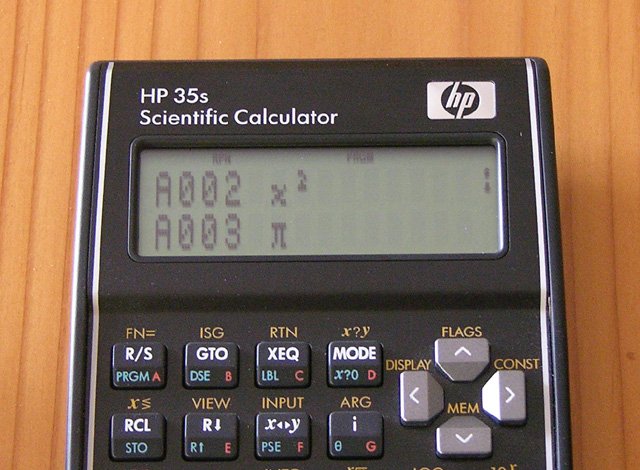
Two lines of an HP 35s program to compute the area of a circle.
Of course, if that’s all there were to programming, there wouldn’t be much to say about it. However, there’s a lot more. The simple “same sequence of keystrokes you’d use to solve the problem manually” type of program can be augmented by looping, conditional tests, and branching. This means that the calculator can perform repetitive operations, make decisions, and perform alternative calculations while computing the answer to a problem, just like a full-blown computer.
The HP 35s provides many powerful programming features, including a complete set of x versus y comparison tests (and the corresponding x versus zero tests), both label and line number based branching (which is good, since there are only 26 labels), subroutines (up to 20 levels deep), and looping constructs.
Although many programs can be written to take all their inputs at the beginning (on the four-level RPN stack), programs can also pause and prompt for additional input while the program is running. Likewise, instead of just returning one answer at the end, they can display messages and intermediate results before the program completes.
There are about 30,000 bytes of program memory in the HP 35s, which is approximately enough for 10,000 program steps. This memory is shared with the 801 numbered memories, so as the memory fills up with programs, the number of available memories decreases.
The calculator can hold more than one program at a time, each program being named by a single letter label, and executed by pressing XEQ A ENTER (replace “A” by the desired letter).
If you want to get some idea of the kind of sophisticated programs that can be written, please see my Curve Fitting and Matrix Multi-tool programs for the HP 35s. These programs make use of many of the HP 35s’ programming features including comparisons, looping, subroutines, indirect memory addressing, message display, and data input and output. One doesn’t have to write programs as sophisticated as these to take advantage of the 35s, but the power is there when it’s needed.
The one shortcoming of the 35s (and HP’s other programmable non-graphing calculators after the HP-41C series with its optional magnetic card or tape storage), is that there is no way to save programs outside of the calculator other than writing them down. There is no printer output, removable memory card, or PC connectivity. However, the calculator does retain its programs when turned off, and the dual battery feature lets you replace the batteries without risk of clearing the memory. The only way you can accidentally lose the programs is if you let the batteries run down, or the calculator malfunctions.
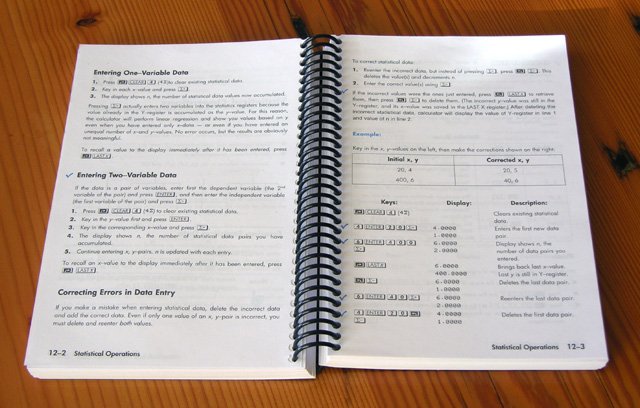
The manual is good, but I had mine spiral bound to make it easier to use.
The Manual
The 200 page manual is quite good, being printed in two colours and reasonably thoroughly covering almost every feature of the calculator. There are a few errors, which appear to have crept in because the manual was derived from that of the HP 33s, with which it shared some, but not all, features. In order to make the manual a bit easier to use at my desk, I had the local Kinkos shop cut off the square binding and then spiral bind it. This lets it lay flat while open to any page (most earlier HP manuals came bound this way).
[January 2008 Update: Recent purchasers have discovered that the calculator now comes with only a 24-page printed getting started guide and a CD containing the main manual in PDF format. Although I’d like to have a PDF version of the manual for use as a reference, I prefer the paper version for just sitting down and learning all about the calculator.]
Conclusion
Does the HP 35s live up to what one would expect from a 35th anniversary offering from the company that invented the scientific calculator, and once made the best such gadgets on the market?
It comes pretty darn close! There are a few quirks in both appearance and functionality, but it is a step in the right direction. It looks like an HP calculator, it feels like an HP calculator, and it mostly works like an HP calculator ought to. Whether this is a promising sign of things to come from HP, or a last stand, remains to be seen.
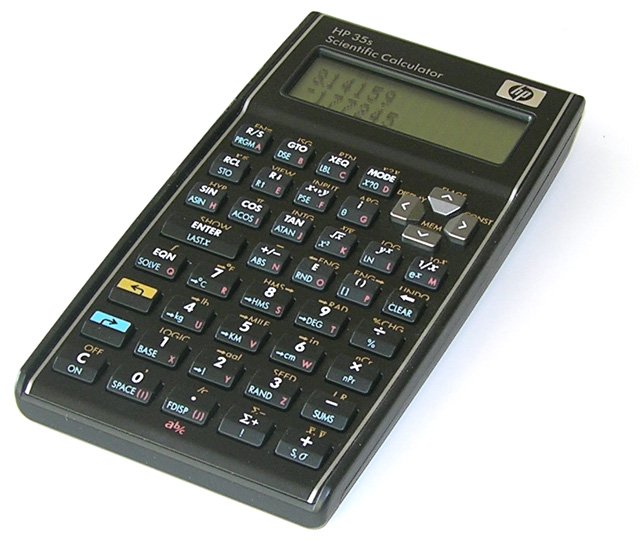
The HP 35s comes pretty close to the look and feel of HP’s calculators of days gone by.
The programmable calculator occupies an ever narrowing niche. Most problems can be solved using a simple (possibly scientific) calculator, and those that can’t are usually done on the now ubiquitous computer. Higher-end graphing calculators, although somewhat harder to learn to use, can often solve the in-between problems without the user having to resort to programming. On the other hand, a programmable calculator works like an ordinary calculator, making it ideal for day-to-day use, but with the programming capability there when a complex or repetitive task presents itself.
I am of course a collector of historical HP calculators, but I’m glad I bought my HP 35s. It is a calculator I actually use, and so far, it has proven itself worthy of the Hewlett-Packard name.
The HP 35s is available from many college and university bookstores (I bought mine at the York University bookstore in Toronto), or on-line from Amazon.com.


Related Articles
If you've found this article useful, you may also be interested in:

If you've found this article useful, consider leaving a donation in Stefan's memory to help support stefanv.com
Disclaimer: Although every effort has been made to ensure accuracy and reliability, the information on this web page is presented without warranty of any kind, and Stefan Vorkoetter assumes no liability for direct or consequential damages caused by its use. It is up to you, the reader, to determine the suitability of, and assume responsibility for, the use of this information. Links to Amazon.com merchandise are provided in association with Amazon.com. Links to eBay searches are provided in association with the eBay partner network.
Copyright: All materials on this web site, including the text, images, and mark-up, are Copyright © 2026 by Stefan Vorkoetter unless otherwise noted. All rights reserved. Unauthorized duplication prohibited. You may link to this site or pages within it, but you may not link directly to images on this site, and you may not copy any material from this site to another web site or other publication without express written permission. You may make copies for your own personal use.
Howard Lazerson
January 20, 2008
Nice overview of 35s, brief and accurate.
Ubiquityman
January 21, 2008
Thanks for the review. I’ve been looking for an HP calculator since I broke my HP48SX w/ original "A" ROM. I’ve been looking for a replacement. Not sure to go with a 50G or a used 48GX. I knew I didn’t want the 48GII or 49G because of the keyboard.
I’m just curious what 20 years gets me in terms of technology with the 50g+. Is it much faster than the 48SX?
I’ll have a serious look at the 35s. I don’t need all the power, but I would love to be able to see more numbers on the stack.
Jim
February 21, 2008
Nice site and good review, Stefan.
I’ve been using HP calculators since high school 30 years ago, but recently I started thinking that I should have a backup in case my 42s stopped working. I found your site after looking up the 35s on the HP site and yes, you’re right, the 33s is a seriously ugly calculator.
I’m very happy that the 35s is an old school HP calculator – the way it should be. It’s too bad about the manual, however. My original, spiral-bound 42s manual is in my desk and will likely outlast me. CD’s degrade and simply are not as pleasant to work through, as you said.
I’ll be picking up a 35s in a day or two.
Thanks again.
Jim
Jim
February 23, 2008
Some initial impressions of my new 35s:
It’s a little thicker, taller and lighter than my 42s and the keys have a little more of a "click" sound when pressed. The viewing angle and image quality of the 35s lcd display is also much improved compared to the 42s.
The calculator also comes with a nicely designed, zippered, clamshell-style storage pouch. It’s a stylish case that matches the quality and feel of the 35s.
Aside from the instruction CD and booklet, the 35s also came with a "Bonus DVD! The HP Calculator Story 1972-2007". The DVD movie is a slickly produced marketing piece using HP insiders and industry types to extol the virtues of HP calculators and HP itself. It’s not very informative, but it is well done.
Thank goodness HP still makes RPN’s because once you use one, it’s tough to go back to algebraic. By the way, my records show that at C$61, the 35s cost me half what I paid for a 42s sixteen years ago!
Eddie Maddox
March 19, 2008
Well, I have the 33s, and I’m keeping it. Ugly, yes, but the "ENTER" button is right where it belongs, and the right size, too.
Thank you, Eddie Maddox
Mal
March 19, 2008
Thanks for the great review. I just ordered my HP35s to complement my HP48G. I’m going to be po’ed if it comes without a full paper manual, though.
Miguel
May 10, 2008
I am already with my HP-35s and I liked it very much! As soon as I saw it in the WEB I started searching it here in Brazil. Well I found it but paid US$ 215, that is the price in Brazil !!! Much more easy to use than my dino HP-49G+ (that I agree is a fantastic calc.).
Now I expect HP releases a "modern" HP 42s, with more memory, expandable, USB port BUT old fashion lay out AND RPN program language!
Regards,
Miguel
Samir Kopas
May 12, 2008
Hi All, I received a brand new HP 35S calculator and I got surveyors programs for 32S II, but I cannot find function for polar and perpendicular coordinates (x,y↔θ,r). Do I need to buy a new one or do you know how to solve this problem? Thank you.
Stefan Vorkoetter
May 13, 2008
Samir, the HP 35s doesn’t have polar to rectangular conversion. Instead, you have to enter rectangular or polar coordinates as a complex number, and then display them in the other format. See page 4-10 of the User’s Guide.
Alternatively, you can use the programs posted at The Museum of HP Calculators.
Mark Wales
June 08, 2008
I have not tried the HP 35s, but: I normally use my HP-11c calculator by touch. For me, I need the +, – , ×, and ÷ keys to be to the right of the decimal, 3, 6, and 9 keys. I have a hard time with other calculators. (The Sharp EL-506D calculator has a similar layout for these four keys). I also value the HP’s "click" keys.
Cliff Dixon
August 19, 2008
Like someone commented earlier, once you go to RPN, it’s hard to switch back. I’ve been an HP calculator user since I bought a 15C twenty years ago (still works, although not in my possession anymore). Soon afterwards, though, HP came out w/ the 48 series of graphing calculators, and I moved to those. As good as those are, they didn’t last nearly as long; I’ve gone through FOUR of those in the timeframe since the 48SX was released. I’ve had a 49G+ for a couple of years now, but I hardly ever use it (afraid I’ll break it). The sad fact is, for the most part, I never needed to use most of the functions, including graphing, in the 48 series.
Since I can’t get my old 15C back (at least not until Dad dies and I get it, a 29C, and 97 in the Will), I’ve been looking for a good non-graphing HP scientific that I can REALLY use. I received my 35S in the mail last week; so far, I’m loving it!
Miguel
September 13, 2008
Dear friends,
The new HP 35s is really almost what we prayed for long years. The only thing HP should had made is soft menus and alpha labels in programming. This really lacks.
Now, for those that need financial AND some scientific, go fast and try te new HP 20b. Next prey: HP 42s reload!
Regards,
Miguel
"…all that we need is wine and good company!"
qrk
October 01, 2008
Almost a nice calculator. They put too much emphasis on programming and little emphasis on it being an effective calculator. I would say it’s fine for students, but for a working stiff, it is a cumbersome calculator to use. They messed up the following:
1. Hex entry if you’re in hex mode is cumbersome. You need to hit a few extra keys to enter a hex number while in hex mode. Obviously, never reviewed by a real programmer.
2. If in the display All mode, the exponent is off screen. Try enter 2/300. You need to scroll to see the exponent. How lame is that! They even show this defective display in the manual.
3. Decimal could have been larger.
Obviously, the old design team wasn’t around to supervise this design and the new team didn’t have a clear understanding of the previous designs.
I hope they improved on the keyboard connections that has plagued HP calculators. Just got done tightening up the fasteners on my 18 year old HP32s last night.
Nola Bernstein
October 26, 2008
My HP 32SII has just died and have had to replace it with HP35S (only 36 hours old. I now have to program standard deviation and can’t find <> key. Please help!! Have had an HP since 1972 and it would be the first thing to rescue if my house caught on fire. The review was superb. Hope it lives up to it!
H. Karl Outram
November 24, 2008
Just read your review of the HP 35s. I’ve owned & used HP45 & HP67’s in the distant past. I still have them, altho the NiCads are all defunct now. After reading the review I just had to get the HP 35s (from HP for $51.00). The lack of a simple Polar to/from Rectangular function is going to make impedance calc’s more difficult for me. Guess I’ll work around it. Thanks for a clear review.
Karl (NI9T)
Dave Hayden
November 29, 2008
I’m surprised that HP created this calculator without any way to move programs on/off the calculator. I can’t imagine keying programs in by hand.
I have a 50g, but I think my favorite is still my trusty 41CV which I always keep handy.
Elizabeth Thompson
December 03, 2008
I got back into RC a couple of years ago and found your site.
I had jsut about given up on HP until I found your article on the new HP-35s. I have a HP48sx & gx and a 32sii which is my workhorse. I have wanted a newer 32sii repalcement and think I have found one in the 35s – WOW it looks like the old LED versions my Dad had.
I always laugh at work when someone tries to use my RPN calculator.
Thanks Stefan!
Liz 🙂
Air Run Haul Away
December 23, 2008
The HP35s has problems that are very frustrating. (1) My HP35s is not reliable when pressing keys quickly. I have found several reviews online which say the same thing. My HP48g that I bought in 1994 has always been completely reliable, so I don’t understand why the Hewlet Packard Corporation is not capable of producing a calculator in the 21st century that at least matches the reliablitiy of the 48g. (2) When pressing the eng left or right keys in order to change the decimal place to match the engineering units that I need, the stupid calculator displays too many digits so that I am forced to scroll right in order to see the scientific multiplier that I need to write down. This is despite the fact that I have my display set for less digits. This is very annoying! (3) There are other problems which are not as significant, but I would be happy if Hewlet Packward would at least fix the first two problems that I have listed. Apparently HP has some sort of patent on R
Anselmo A. Peretto
January 06, 2009
Very nice article. Two words for HP 35s: versatility and robustness.
Gregory Schmitz
March 04, 2009
Good write up, though a lot is over my head.
I used to work with Surveyors who used the HPs and got used to the RPN. When I went into facility maintenance and needed an engineering calculator, that’s what I got.
Sadly over the years mine got beat up or simply died.
HP20S saved me, RPN was lost, but conversions I used (metric) were there and I got used to it.
I got two backups as I knew the lead would die someday. Sad was the day when I opened up my backup and found they had gone to the ugly Green and White functions options (I vote that the ugliest traditional HP).
My green one died and I was delighted to find that my other backup was a blue and gold.
I have since bought an HP35S to ensure I have a backup to the more shirt pocket friendly HP20S (smaller). I will get a second one to ensure I have one till I give up the tools, just in case they quit making them again.
I would love to be able to buy an RPN HP20S equivalent, as I don’t need the power or
Olivier Marsigny
March 25, 2009
Thank you for your review.
I agree with most of your comments. I bought the 35s just before getting a 41 CX, and I am happy with both calculators. They are different, but I use them more than my 48 G+, that I make work just for the integrated library and sometime the symbolic calculations.
I wonder if HP have the project to make a super 41 c, having some of the item of 35 s and just what is existing on 41 CX. Does anyone hear about such an idea?
Thank and have all pleasure by still using RPN calculator ; thanks to HP to still product such calculator.
Olivier
Vincent Pepe
May 02, 2009
I am looking for a copy of the Commodore PR-100 programmable calculator. Does anyone have a copy to sell or can anyone provide information as to where I can locate one?
Thank you for any help you can provide.
vpepe777@msn.com
Kevin Jespersen
June 25, 2009
Thank you for your insightful review. As much as I’d like to get the HP 50 series graphing scientific; I hardly used the graphing functions on my old 28s. My 28s would still be working but it was in my backpack that was drowned in a Suburban in a lake (long story).
I have been looking for a replacement that I could still use in the classroom without too much of a learning curve from the 28s (1 manual / 1 reference, both of which I read cover to cover). I spent a week programming the HP 28s to do all of the calculations for any AC circuit automatically, which does involve many steps of polar to rectangular and back. I miss the 28s and would settle for the 48g that replaced it but either on eBay are ridiculous, though I did see a "new in box" 28s on eBay going for $150 Buy It Now, but then I might as well get the 50s. Thanks.
Roy-Egon Kleveman
July 14, 2009
I’ve had my 35s about a year or so, but I always go back to my trusty 28S or 32Sii. The quality of the 35S sucks (in my opinion) in comparison to earlier (real) HP calculators. I’ve have a 28S, 32Sii, 41C, 48SX and now also the 35S. I don’t like the keys on the 35S and I think the decimal point is ridiculously hard to read. But, it look like an old school HP which is promising and to be honest, I bought the 35S just because it looks cool.
Juergen Nickelsen
August 11, 2009
In the late 1990s I thought I’d by the last calculator for good, and it was the 32SII. It fulfilled (much more than) all my calculator needs. But then I saw the 35s, and to my joy I got more for the used 32SII than I had to pay for the 35s. Now *that*’s a good deal!
The features are more than I’ll ever need from a pocket calculator, and I like the look, much more than anything else HP has made the years before.
Lee Broussard
September 11, 2009
Am a retired Pet Engr who was forced into retirement earlier than I wanted to because HP quit supporting the 41C. I had approx 100 critical programs pertaining to all phases of Pet Engr that I had designed myself (as an example I designed a program to determine swab and surge pressures pulling out of the hole or going in the hole that was not dependent on the mud flow properties) which were worthless when I couldn’t get my 41 repaired or replaced. I’ll never forgive HP for that or buy another of their products. To redo the many reverse polish logic programs to algebraic logic would have been a monumental task.
Lee Broussard
Macchi3
September 19, 2009
Thank you very much Stefan for a nice review of the hp35s and a nice website! Best Regards, /Macchi
PS: Actually many of these topics on your website also happen to be among some of my interests!
cb
October 08, 2009
I just bought a 35s, and when my dad found out (I’m 28, and a grad student) he gave me his old 42s. Objectively, the 35s isn’t bad. If I didn’t know what I was missing, I would say it is just fine.
…But when you look at it compared to the 42s, it is plain awful- and baffling! I’ve had each for about 2 days now. It seems the 35s has less functionality, more keys (very, very cluttered keys), a worse display… it goes on and on.
My two biggest complaints are 1) It is physically larger than the 42s and is barely a "pocket" calculator and 2) the stack manipulation keys (Roll down, x<>Y) are, inexplicably, "off in space" separated by a row of buttons from the number keys and Enter key. For me, the x<>y key gets the most use (other than enter, numbers, etc) and to have it in such a strange location is mysterious.
Regarding the "tiny decimal point" issue: on many calculators (42s included) the decimal takes the place of w
Richard Reed
October 14, 2009
To Lee Broussard: I realise this is a month later and since you found Stefan’s site, I guess help like his article to repair HP 41 didn’t help. There are also others around the world who help with old HP’s, like at http://www.hpmuseum.org, where anyone can post comments or classifieds.
HP 41 and its thinner but I/O-crippled cousin, HP 42s, can be had on eBay at a price ($200 or so now for 42s). There are emulators for 42s that run on PDA’s and PC’s and some port their 41 programs there and then key-enter them into a real 42s.
Stefan: Great review! I may pause my quest for a 42s to see if HP will do a smaller, better 35s successor that has at least an SD card.
Ray Kornele
October 24, 2009
I have two TI-30 calcs. The reason I have never owned a HP RPN calc, is not because of operating difficulty. It is because of ownership difficulties- They cost too (bleep)ing much. HP tries to maintain snob appeal. The purchaser pays for the snobbery.
Stefan Vorkoetter
October 24, 2009
Ray, I don’t think HPs are high-priced for snob-appeal. I think they’re expensive because they’re better made. The two HPs I use every day are 31 years old. How many TIs that old are still working?
Clay
November 13, 2009
I bought an HP 35S as soon as they came out, but was disappointed in the first hour of use. It’s physically too large for comfort and the key layout is really bad. As pointed out earlier, many of the keys are located off in space (e.g. roll down and x<>y). Also, common functions that used to be one push, now require two key pushes. But the biggest problem for me is when I use it for hexadecimal calculations. Who at HP thought it was logical for the default input base to be decimal when operating in hex? You have to type in the number and then remember the magic incantation to indicate that it is a hex number. I immediately went back to my 32SII and put the 35S on the shelf. My old 32SII just died, so I spent the big bucks and bought a used one on eBay. I hope someone at HP is listening. They need to fire the 35S design team and put the 32SII back into production.
Doug Cruse
November 24, 2009
I returned my 35S when I discovered there was no direct polar to rectangular conversion key. That is an unpardonable sin to a Land Surveyor. I know there is a work around, but it is much too cumbersome. It is a step in the right direction in terms of quality when you compare it to the 33S, but overall an insult to HP’s heritage when you look at the 11C or 15C and the 41CV or 41CX. Why HP cannot see that there is a demand for something like the 11C and or 15C and step up is beyond me. I guess there is not enough money to be made in giving people what they want…
Mark Graybill
January 27, 2010
To solve the rectangular-polar problem: Write a short, unlabelled program as the first program in memory. Then R/S will become your coordinate conversion key.
I’m happier with the HP-35s than any other HP calculator since I got my brand new HP-41CX. The keyboard layout is different, but I can live with it, for the sake of the good old keycap shape.
I think it’s a great value for the money. I hope they sell like hotcakes so that HP will feel inclined to do a redesign of their higher end calcs with I/O ports, text functions, and more memory.
paul dawdy
February 27, 2010
The feel of the keys is different enough from the previous generation of hp calculators and it does not live up to what one would expect from a 35th anniversary offering.
Bill Classen
April 02, 2010
My 15c and 41cx are still working fine. The constant rising of eBay prices has me reluctant to carry them around, so the 35s is interesting. I just brought a 33s for my niece hopeing to get her past math screaming. The layout and quality of the older HP’s is better because they were designed to be used by the designers, (credit Mr Hewlett).
Paul Ludwinski
June 16, 2010
I’ve been using my HP 15C since 1982 and it has served me flawlessly all these years. However, I think it’s time for an upgrade and I’m excited to see what the 35s will do. The 15C was bit slow with program execution.
Stefan Vorkoetter
June 16, 2010
I haven’t done any speed comparisons, but from the benchmarks I’ve found on the web, the 35s appears to be about 4 or 5 times faster than the 15c.
Ian Board
August 12, 2010
I just bought one to supplement my aging (but loved) 41CV. What I like:
The overall size, feel and package and the display. I know some pine for bringing back the HP-15, not me. I find ‘portrait mode’ calculators easier to use while holding in the hand than ‘landscape mode’ ones.
Complex numbers.
The display when you do a linear regression – the little mini-menu above to look at different calculated quantities is nice.
The unit conversions are handy as are fractions (especially for work around the house).
I liked the little scroll quadrant.
What I didn’t like:
Not putting an SD card (or similar) port, or even a USB connection on this borders on criminal negligence. It would open up a whole bunch of possibilities and the marginal cost would be slight.
I use logic calculations and base conversions a fair amount and the entry of hex and binary numbers needs to be improved. You put this in hex mode, for example, then enter a number and then have to terminate the number with a ‘h’ – even though the base is understood. This is really retarded. Come on HP! I used to have an old $10 Casio calculator that was better for making hex and binary calculations.
When possible, operations should be paired with their inverse on the same key – eg, log() and 10^x.
I was surprised that this understands e^x when x is complex, but other operations like x^2 don’t work on complex numbers – why the inconsistency?
I don’t really agree with the common nit about putting STO on a key unshifted. I’m ok with it being shifted – I use RCL (unshifted) a lot more often than STO.
There should be a direct rect->polar (and vice versa). I used this a lot on the other ones. I can live with what it has though.
R/S belongs at bottom right. Period.
Overall, though. I find this pretty usable and the best (new) RPN calculator out there. What I find maddening is when you see products like this one that are ‘almost right’ that could be made near perfect without much effort. This is the only reason I may seem to rip into it. On the whole, I would give it about 8/10.
DS
August 15, 2010
In reference to the user guide, I called HP and requested a printed user’s guide. They sent me one free of charge. I may get mine spiral bound like yours for the PE exam to help with using it.
Stefan Vorkoetter
August 15, 2010
Are you allowed to take the book into the exam?
F.P.Hampton
October 14, 2010
Having read your assessment of the scientific, programmable calculator the HP35S I am interested in the purchasing of one such for my own use, as I do a lot of programming by calculator. Could you put me in touch with an HP sales outlet to make such a purchase possible?
Stefan Vorkoetter
October 14, 2010
Hi F.P.Hampton: The calculator is available from Amazon. See the link at the end of the paragraph immediately above this “Reader Comments” section.
Rainer Reitz
October 21, 2010
Hi, is there a POLAR function (having x and y and getting the distance and angle)?
Stefan Vorkoetter
October 21, 2010
Hi Rainer: No, there is no polar-to-rectangular or vice-versa. However, the calculator can work with complex numbers in both polar and cartesian forms, so you can achieve the effect by entering a complex number in one form and displaying it in the other. Of course, you can also trivially implement actual polar-to-rectangular conversion as a short program.
Mike Ngai
November 01, 2010
Any one interested in HP35s should check Walmart.com (U.S. only) about $50. I just ordered one online from Secena College (at York campus-Toronto, Ontario) book store for $77 include HST, York U book store is about 83 plus tax.
Stefan Vorkoetter
November 01, 2010
Mike, it’s currently $44.51 at Amazon.
Trond Sigurdsen
November 26, 2010
Hi Stefan! Tanks for the review! Before I mention a somewhat negative point about this calculator, let me first say that I actually like it quite a bit. I hope HP continues along these lines. Having said that: someone mentioned speed comparisons, and I just ran a simple test against my old HP 32sII (which I thought was broken, but it came back to life). The result? The old HP 32sII is actually considerably faster (a bit more than twice the speed!). This is not a big problem for my everyday use, but if you like complex programs (or program loops) it could get annoying. Still, the new HP 35s has some nice features that are lacking in the older model.
Garrett Smith
December 15, 2010
Thanks for the excellent review. I just bought one, the minus key didn’t work (first noticed when trying to change contrast…then realized it was seriously a problem later when trying to actually do something useful!) Amazon.com, printed out an RMA sheet, free shiping label and sent a new one the same day in one slick move. I simply stuck the broken 35S in the original box, pasted on the label and stuck it in the mailbox. Go Amazon! At least that part works right! The calculator? I really like it. I’m an HP lover since 1986 with HP41CV, 28S, 48SX, 48GX,etc. My wife thinks I’m nuts because I just bought a 50g and a 35s when my two 48GX’s were working just fine! BTW, my replacement 35S seems to have nicer keys than the one I sent in…a little matte finish that grabs the finger like the old joystick on IBM laptops. Keep going HP, you’ll get there. There were some really clever people designing calculators in Corvaillis, OR back in the 80’s.
Ton Dedios
February 08, 2011
I just bought a hp35s and i get a program cogo from ebay for hp35 but i dont know how to install. . i need help to install that program. ..
Stefan Vorkoetter
February 09, 2011
Ton, I suggest you read the part of the manual that describes how to enter programs, and/or contact the person who sold you the program.
Hendrik Grobler
February 18, 2011
I recently bought the HP35S.I have been a HP owner since 1972 starting with the HP35 and HP45 calculators. Incidently the HP45 is still operational. I also own a HP42S which recently decided to go haywire after many years of service. I thoroughly enjoyed it , especially its complex function capabilities and ease of operation. The HP42s is much simpler to use. What I love about it as opposed to the HP35S is the menu functions that each key has. I don’t like the three function options of the HP35S per key. The positions of the keys are also different from what I am used to. In addition to this the HP35s ‘s batteries only lasts one month whether used or just stored. I would much rather have my old Hp42s back
Stefan Vorkoetter
February 19, 2011
Hendrik, my HP35s’ batteries lasted over a year. Perhaps your calculator sat on the store shelf for a very long time?
Marga Van Meel
February 23, 2011
Hi, definitely a Belgian HP lover here ! Since a few weeks my HP32SII doesn’t work anymore, so considering buying the 35S … Problem : in Belgium prices are 65 EUR (or 89 $) ! I saw indeed on Amazon 44 $ but shipping is not possible to Europe as I understood. In July we travel to the US for a roadtrip westcoast (LA – Phoenix – Las Vegas – San Francisco). I could buy one at that moment, but I was wondering which stores I should look out for to find the HP calculators ? Anyone a suggestion ?
Stefan Vorkoetter
February 23, 2011
Hi Anonymous Belgian HP lover! Will you be visiting friends during your trip? If so, you could order from Amazon and have it shipped there.
Ariel Gonzalez
March 08, 2011
I love my HP 50g
Charles Kanavle
May 01, 2011
for me what this calculator needs desperately is 1-a USB port, and 2-PC programming software app. Then you can see your whole program at once, edit to your heart’s content, save it permanently on your HD, and download it to the calculator. Having to push hundreds of buttons into a 2 line display is tedious, and lord help you if you accidentally do a “clear all” command.
I am already jaded because I have an Alesis SR-18 drum machine, which is the hottest, after the SR-16 lasted for like 20 years, but entering sequences is so very tedious on its text display that I am planning to give it away.
So, I love using the HP35s, but will only enter very short programs to save some keystrokes.
Stefan Vorkoetter
May 01, 2011
Charles, I more or less agree with you. Although I wrote a pair of LARGE programs for the HP-35s, I most write little 10- or 20-liners to solve an immediate problem at hand, just as I did with the programmable calculators of yesteryear.
Mike Inoue
May 16, 2011
I have a warm feeling for RPN calc. like this. HP35s is good but 41CX is the best for me.
Giorgio Costantini
May 16, 2011
Wonderful! Finally a hp aesthetically reminiscent of the old historical hp,
as well as powerful also nice …:-)
Bernard Maire
May 26, 2011
I had almost all of them. I know, 41CX was a great product but, for nostalgic one’s, like me, the 35s is a must to have !
Suresh Chapagai
June 11, 2011
I have one hp 42s scientifice program able calculator bur manul is’t manul so i can’t make the program so how can sholve my problam. people say that it is good but i think it is not good.
pkalen
July 06, 2011
I use rectangular to polar heavily, started a simple traverse-inverse in memory banks on an HP 55 a long time ago. The HP 35 killed the simple key approach. World class stupid. I regret the purchase profoundly – it is a time waster.
Matthew Mangani
August 24, 2011
Just wanted to let you know the blog is cutting off part of the last letter of each line. I don’t know why.
Andre Duarte Bueno
October 30, 2011
I am a longtime user of HP calculators.
I was in college one HP11C (~ 1983); in university one HP41CV (~1986) with engineering and statistics modules;
and one HP48SX (1990) – so he was released! – used in master’s and doctoral degrees.
Now use a HP50G;
HP15C also bought a special edition and a HP35S.
congratulations on the return of the classic design and programmable RPN calculators!
these calculators represent the name and brand hp preserve them is critical!
SUGGESTIONS FOR CORRECTION HP35S:
– Direct access to the STO button
– Rectangular <-> Polar
– Alpha register, like 41cv!
– Usb or wifi or memory chip!
– Manual with more programming examples!
in my opinion, rpn programmable calculators are a great teaching tool in engineering.
millions of engineers learned to program with these calculators and their return is wonderful for the new generations! congratulations!
Rine Towfique Anam
November 14, 2011
is this available in bangladesh?
Sagar Neupane
February 22, 2012
I am using hp32sII Calculator from last 20 year but now I have hp35s there is some thing different in hp32 we can use polar to rectangle or rectangle to polar on this we can get directly whole circle bearing if value is negative we can just 360 + but in hp 35s there I can’t understand how I can get that system.
lwatkins
May 15, 2012
Am I the only one highly annoyed that the numbers stack to the left (and hence the decimals do not line up) in RPN mode on the 35s? I used a 41CV throughout college, and bought a 48S about 25(?) years ago. The only reasons I bought the 35s was for the adjustable display and the lithium batteries (my 48S needs 3 new AAA batteries almost weekly).
Since I can’t return the 35s, it will go in my drawer for occassional use only when the battery supply is out for the 48S.
Other than the stupid left-stacking numbers (in RPN mode) it looks good, feels good and the adjustable display is nice.
Andreas
June 05, 2012
Just so you know HP 15C’s are selling new @ HP USA
Walt
December 11, 2012
The calculator seems to be ok, but just try to ask HP for any help solving a problem. Their response is “I’m not trained for that”. WHAT?
Stefan Vorkoetter
December 11, 2012
Walt, do you mean using the calculator to solve a problem, or that you’ve found a problem with the calculator. HP’s customer service should be able to help you with the latter, but they’re not mathematicians and I wouldn’t really expect any help with the former. Your best bet for getting help with using an HP for problem solving is a forum like the one at http://www.hpmuseum.org
Marcos Nogueira (S. Paulo - Brazil)
December 21, 2012
Excellent review. Now I know what HP model will replace my aging 32s, which is bundled with financial programs.
miles
March 14, 2013
has anybody figured out how to use the sum button with the polar-rectangular the way the older HPs will. I used to be able to punch in angles and distances – go rectangular and store on sums then recall and go polar to get inversed angle and dist to last point punched in.
my new 35s won’t do that.
Chris Smith
March 17, 2013
I went for a 50g. In RPN/RPL mode it feels a little less clunky than traditional HP calculators. Display modes are nicer and don’t roll of the screen like the 35S. Having string support and named programs and vars is also rather nice. It also has loads of decent fundamental types such as int, real, rational, complex, list, string. Unlimited stack is nice too and the keys are good. I think its worth the extra cash. It is more of a computer than a calculator.
Oh forgot to add, it has a numeric and symbolic solver and CAS and an SD slot so you can back up your programs and data.
I’ve never drawn a graph on it for reference. I think that’s a sales pitch for students.
My only criticism is the manual is a pdf and is rubbish.
Dan Johnson
March 18, 2013
I’m confused by comments about the 35s not having PR or RP conversions. It does that, though it’s not necessarily obvious. (There’s a section in the User’s Guide about it, p. 4-11 and pp. 9-2 ff. in my copy).
To do this, you set the complex display mode to what you want to see and enter the complex value using the other representation: x i y, x + y i, or r theta a. (Note: x + y i is only available in ALG mode.) Or enter it first and flip modes to see it in the different representations.
You don’t need to switch modes to enter values using one representation or the other: the mode setting controls only how these values are displayed.
Also, you can get the argument (angle) value from a complex value with the ARG function.
Dan Johnson
March 18, 2013
Here’s where you can find two short programs to make Polar/Rdctangular conversions more convenient, if you wish: http://www.geocalc.com.au/uploaded/HP35S%20Rectangular%20Polar%20Conversions.pdf
Stefan Vorkoetter
March 19, 2013
Dan, the problem with using the complex mode is that it just _displays_ the conversion. There’s no way to get your hands on the actual r and theta values to do further computations with them.
Tony G.
July 05, 2013
I threw my HP 49g+ in the bin as a result of the broken keys, appetite for batteries, rub-off paintwork, and anyway I just wanted a calculator not a computer, of which I already have several. I replaced it with a 35s, expecting it to be more practical, and it is. It does have obvious basic flaws, which others have listed, but as an everyday calculator which can still pack a punch, I’m happy with it, though looking forward to version 2.
Claudio Giomini
August 30, 2013
The calculations I have to perform involve storing and recalling a large number of numerical values. To this purpose, my old HP 42-S was perfect, because it stored these values as named variables, as many as I needed. Unfortunately, it “died”, and is not produced any more. So, I have to shift to HP 35S, which has “only” 26 named memory position, plus up to 801 indirectly addressed numbered memories. Before purchasing HP 35S, I would be sure that storing and recalling numbers from these numbered memories can be done not only within a program, but also in normal unprogrammed calculations carried out by the user. My doubt rises from the fact that, in the user’s guide, keys (I) and (J), that should be involved in this kind of operation, are said to be “programming functions”. Can someone help me? Thanks in advance.
Stefan Vorkoetter
August 30, 2013
Claudio, to use the indirect registers, you first have to store the desired register number using STO I or STO J, and then you have to store the value using STO (I) or STO (J), or recall the value using RCL (I) or RCL (J). The HP-42S was definitely better in this regard.
Claudio Giomini
August 31, 2013
Thanks for your quick answer. But storing and recalling numerical values by means of keys I, J, (I), (J), can be done also when the calculator is not executing a program ?
Stefan Vorkoetter
August 31, 2013
Yes, it’s just a little bit awkward.
Claudio Giomini
August 31, 2013
Thank you again.
Robenroute
September 15, 2013
First of all, thanks for a nice review of what looks like a decent calculator. It seems that there are still many people choosing a non-graphing scientific calculator over a graphing one; I definitely do! I was brought up on HPs and RPN (11C, 34C, 41CV, 41CX) and although I’ve tried different other calculators, nothing beats a good old HP. Unfortunately, the only one I have left is my 41CX (and a 71B, but that’s not pocketable), and that has died… In search of a proper replacement, I’ve stumbled across the inspiring WP-34S project. It seems to address many of the complaints posted above and offer what I’m looking for, and then some. Perhaps others might be interested and check it out.
There are Windows, OSX and Linux versions of the WP-34S emulator (downloadable from sourceforge). I’ve been playing around with it and this is it (for me, that is).
Hope you’ll enjoy it as much as I have so far…
Regards.
Pierre Savoie
April 09, 2014
Very good, but please mention you should replace one watch-battery in the calculator at a time, do not take out both at once. If you take out both at once you will erase the continuous memory and all your programs will disappear! Leave at least one battery in the calculator at all times when replacing batteries! The compartment has a message inside also warning you about that.
Barry Moore
April 10, 2016
An excellent review of the HP35s. Just a note on obtaining the angle and magnitude of a complex value. Use the ARG function (Left shift, i) and then LASTx and ABS (Right shift, +/-) function. This leaves R in the x register and Theta in the y register. To obtain the iY (imaginary value) and the X (real value), you then need to use R*COS(Theta) for X and R*SIN(Theta) for Y.
A simple program of 18 lines can do this both these conversions on a complex number placed in the x reg. The program stops to show Theta in the y reg, R in the x reg, then pressing RS to then get Imag part (Y) in y reg and real part (X) in the x reg….
“Program to convert a Complex number to polar and then Rectangular parts”
LBL R, ARG, LASTx, ABS, STOP, xy, COS, LASTx, SIN, Rdown, Rdown, xy, Rdown, X, xy, LASTx, X, RTN
Note the X in the above program is multiply (X or *).
converting the X and Y to a complex number is trivial.
Enter y, press I , multiply (X) , Enter X and +.
converting R and Theta to a complex number is bit more effort and used deMoivres theorem…
Enter Theta (in degrees, press convert to Radian (->R), press I, multiply (X), e^x (EXP(x)), Enter R, Press multiply (X).
Regards Barry.
Barry Moore
April 10, 2016
Note the xy in the above program stands for swap x and y registers.
Steve Ramos
June 18, 2017
Hi, do you know were I can find a Normal Distribution program but only using one label? The program provided by HP is multi-label, I will like to use only one label to preserve the others. Any idea how to convert the multi-label program provided to only one label?
Thanks for any help you can provide.
Stefan Vorkoetter
June 18, 2017
You can rewrite the program so that any branching references line numbers instead of labels.
RG
September 01, 2018
A comment on the WP34S. Compared to a 41CX, it has it’s drawbacks- however it does some tricks the 41 couldn’t. If you can find the hardware flashing cable (or someone who does as I did), you can have an incredible RPN calculator for $30 +/- including the HP business calc (that gets converted) and overlay (for the reprogrammed keys). I love both my 41 and 34s!
Mike Barlow
February 04, 2019
Many thanks, a most comprehensive review from which I feel more confident to buy one. My old “TI” favorite finally gave up after some 40 odd years.
Barry
May 18, 2019
Hello,
Nice article, a bit late to the party but its the last calculator HP in the old school way. I wanted to get a second HP since I have been using my HP27s since 1987.
I recently got an HP Prime G2 and find it more than adequate however not enough programming HP Languages books have been written since 2013.
I am still looking for an everyday replacement for my HP27s and the 35s come into play. However, HP could pack it with more solve functions and a bigger memory as well as USB and emulator to program it easier.
The only thing the HP27s didn’t have was all the programs of the 50g and it could use them.
I am now considering DM42 as the new HP calculator replacement for my HP27s what do you think?
In this day of 2019 is it the DM42, worth it as the new back up norm?
George
June 26, 2020
I had bought 2 HP 35s calucladoras about 3 years ago, they were on sale in a store in my country, when I used the first one the batteries lasted for about 1 month and I thought that maybe they were discharged, then a cousin used one for school and I gave it to him. Then I had the other one stored and after 3 months I took it out to test it, I put the batteries that came in the box and they lasted 3 weeks, then I bought two cheap batteries and I put them in and they lasted like 2 weeks and there I had it in disused and saved. And now since Monday I bought 2 maxel batteries, I thought they were good, but they lasted 4 days !!!! I am very upset, I think it is a hardware level calculator failure, and I don’t know if this can be fixed. I bought him other not so good batteries right now, because I don’t want to be spending money on good batteries and they only last me a few days !! I think this calculator is the biggest scam in the calculator business, because researching around, it turns out that it also has about 25 bugs that were never fixed. HP commissioned the Kinpo company to manufacture them, but they did not do a good quality inspection, and now there are many hanging around and having those factory errors. !!!
Phillip Wynter
July 17, 2022
Hi Stefan,
Would you know where I might find a program for the 35S to convert between Polar and Rectangular coordinates?
Thanks,
Phil Wynter
Stefan Vorkoetter
July 19, 2022
How about using this: https://www.manualslib.com/manual/257003/Hp-35s.html?page=84#manual