The Science of Hammond Organ Drawbar Registration
February 7, 2009
Revised March 2, 2011
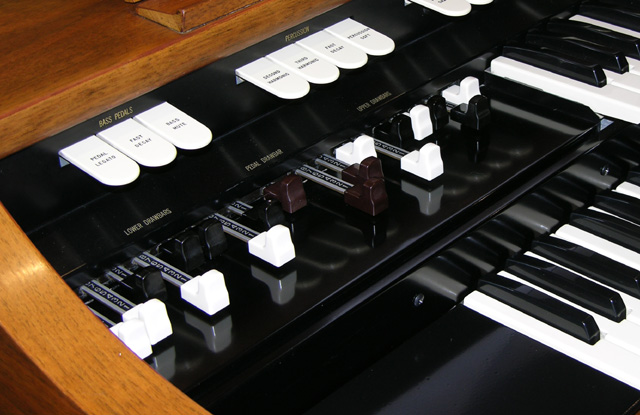
The harmonic drawbars on a Hammond M-111 spinet organ.
When Laurens Hammond introduced the Hammond electric organ to the world in 1934, he gave us an instrument with more control over the sound it produced than any other before it (and many since). The Hammond organ’s drawbars let the player control the nature of the sound at the level of individual harmonics, much like a painter can control the nature of colour by mixing a very few primary colours.
This article is intended to clarify the function of the drawbars, and addresses such issues as combining drawbar settings (for example, how to combine 8′ and 4′ flutes with 8′ strings), and how to create a drawbar setting that most closely matches a particular instrument sound.
A Brief Introduction to the Nature of Sound
Any steady tone has three main attributes: volume, pitch, and timbre (pronounced “tamber”). The first two are pretty much self-explanatory, and won’t be discussed here. The third refers to the quality or character of the tone. Two tones can be of the same volume and pitch but still sound radically different (imagine the same note played on a trumpet and a xylophone).
There are several aspects to timbre, one of which is the distribution of harmonics in a tone. Most tones consist of a fundamental, together with several harmonics present in varying degrees. The frequency of the fundamental is what we usually perceive as the tone’s pitch. The purest tone consists of only a fundamental, and looks and sounds like this:
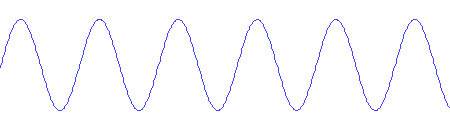
A pure sine wave tone at 440Hz. Click to play.
Harmonics are additional pure tones superimposed on the fundamental, each of which has a frequency that is an integer multiple of the fundamental. Instead of hearing the harmonics as distinct tones, our ears and brain hear a tone of the fundamental frequency, but with a different character than the pure tone. For example, here is a tone with the same pitch as the sample above, but consisting of the fundamental with a bit of the third harmonic (3x the fundamental frequency) and a bit less of the fifth harmonic (5x the fundamental frequency) thrown in:
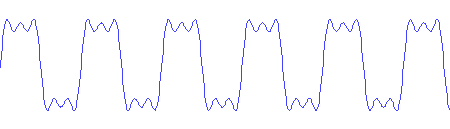
A more complex tone, still at 440Hz. Click to play.
Notice that the tone still has the same pitch, but that the character of the sound is very different.
The Hammond drawbars give the player control over the combination of fundamental and harmonic frequencies. There are nine drawbars for setting the levels of the fundamental and various harmonics and sub-harmonics (lower in frequency than the fundamental).
Each drawbar has nine positions labelled from 0 to 8. Zero means off; the harmonic controlled by that drawbar will not appear in the generated tones. The remaining positions will cause the specified harmonic to appear in varying amounts, with each increment producing about a 3dB increase.
As a convenient shorthand, drawbar settings are usually written as a sequence of nine digits broken into groups of two, four, and three digits respectively. For example, a possible drawbar setting sounding like an 8′ Tibia stop is 00 8040 000.
Drawbar Settings as (Pipe Organ) Stops
The individual drawbars are believed by some to be the equivalent of stops on a pipe organ, but they should not be seen this way. When an organist selects a single stop on a pipe organ, the resulting tone will be a complex one with many harmonics. The complexity of the tone depends on the type and number of ranks of pipes that the stop controls. A stop controlling a single rank of flute pipe will produce almost pure tones, whereas one controlling two ranks of diapason pipes will produce tones rich in harmonics.
Hammond drawbars on the other hand select individual harmonics. Usually several drawbars must be pulled varying amounts to achieve the effect of an individual stop.
For any given stop found on a typical church or theatre pipe organ, there will be a drawbar setting that approximates the sound of that stop on a Hammond organ. Sometimes the imitation will be almost perfect (when all the harmonics produced by the pipe stop are also ones available via the drawbars), and sometimes less so (such as a stop that contains a significant amount of 7th harmonic).
Here are some typical pipe organ stops, along with possible Hammond drawbar registrations to imitate those stops, and an audio clip of each:
| Stop | Drawbar Setting | Sample |
|---|---|---|
| Bass Violin 16′ | 14 5431 000 | Listen |
| Tibia 8′ | 00 8040 000 | Listen |
| Bassoon 8′ | 07 8120 000 | Listen |
| French Trumpet 8′ | 00 7888 872 | Listen |
Drawbar Settings as Registrations
More often than not when playing a church or theatre pipe organ, several stops will be selected at once, causing pipes from multiple ranks to sound when a key is pressed. Some stops are quite boring when played in isolation, so other stops are added to change the character of the resulting sound.
Such a collection of stops to produce a desired sound is called a registration. Registrations can be set up manually by pulling the desired stops, or by means of pre-programmed combination pistons which can activate a handful of stops at once.
If a drawbar setting can be considered equivalent to a stop, how does one create an entire registration? The answer lies in combining two or more drawbar settings into a new drawbar setting that combines the characteristics of all the desired stops. So like a simple stop, an entire registration is also a drawbar setting. The best way to combine the settings for multiple stops into a single setting for a registration is the subject of the next section.
First, here are some registrations consisting of combinations of some of the stops from the previous section, with drawbar settings and audio clips:
| Registration | Drawbar Setting | Sample |
|---|---|---|
| Bass Violin 16′ and Tibia 8′ | 14 8451 000 | Listen |
| Bassoon 8′ and French Trumpet 8′ | 06 8777 761 | Listen |
Combining Drawbar Settings
There are several schools of thought on how drawbar settings for stops should be combined to produce a registration. Mathematical analysis based on the physics of sound and the workings of the Hammond organ show some of them to be misconceived.
The first is from the Dictionary of Hammond Organ Stops, in which Stevens Irwin suggests:
The method is to add the drawbar-indications for each drawbar pitch, using the figure 8 if the sum comes to above 8.
I find two serious flaws with this method:
-
This method doesn’t take into account the fact that the drawbar values are logarithmic (since each increment represents 3dB, and the dB scale is logarithmic).
- Setting all sums greater than 8 to be just 8 is inconsistent. Following this rule means that 8+1 and 8+8 both give 8, whereas the latter should clearly be louder. Furthemore, adding too many drawbar settings together will always yield 88 8888 888.
Irwin then writes:
Porter Heaps suggests taking the largest figure for each harmonic drawbar in the group of stops to be combined as the proper intensity for the final ensemble.
In Hammond Organ Additive Synthesis – A New Method, Paul Schnellbecher responds,
I couldn’t accept the idea that combining two powerful stops and a medium string could be simulated by using the most powerful stop with only a tiny contribution from the string.
Schnellbecher then proposes that a more sensible way is to just add the stops together, and then if at the end of this process any drawbar setting is higher than 8, divide each drawbar setting by 2 as many times as necessary until this is no longer the case. Although I agree with Schnellbecher’s sentiments above, this suffers from the same flaw (not considering the logarithmic nature of the drawbar settings) as Irwin’s suggestion. Furthermore, why divide by 2? Why not 1½ or π? It would make more sense to divide by the highest setting and then multiply by 8, thus giving the loudest drawbar a setting of 8.
A Mathematically Sound Approach
The method I’m about to propose adheres to the following principle:
A combination of two drawbar settings should sound as much as possible as if the two settings were played at the same time on separate Hammond organs (or recorded separately and then mixed).
Let’s first look at combining the settings for a single drawbar, say the first white drawbar (8′). For example, suppose that both stops we’re interested in combining have that drawbar set to 5. It stands to reason that in the resulting registration, the contribution of the 8′ drawbar should have twice the power (√2 times the volume) that it has in either stop alone. After all, playing the same thing on two organs produces twice the output power as playing it on one.
Recall that each drawbar increment corresponds to a 3dB volume increase. That happens to be √2 times the volume, and thus twice the power. Therefore, the resulting setting for the 8′ drawbar should be 6. In drawbar setting numbers, 5 + 5 = 6. Similarly, 1 + 1 = 2, 2 + 2 = 3, 3 + 3 = 4, 4 + 4 = 5, 5 + 5 = 6, 6 + 6 = 7, 7 + 7 = 8, and 8 + 8 = 9. In other words, whenever combining two equal settings, the result is one increment higher than that setting.
What about unequal values? The trick is to convert from drawbar setting numbers to linear power figures, add those together, and convert the sum back to a drawbar number. The following table gives the correspondence:
| Drawbar Setting |
Linear Power |
Power Range |
|---|---|---|
| 0 | 0 | 0.000 – 0.706 |
| 1 | 1 | 0.707 – 1.413 |
| 2 | 2 | 1.414 – 2.827 |
| 3 | 4 | 2.828 – 5.656 |
| 4 | 8 | 5.657 – 11.30 |
| 5 | 16 | 11.31 – 22.62 |
| 6 | 32 | 22.63 – 45.24 |
| 7 | 64 | 45.25 – 90.50 |
| 8 | 128 | 90.51 – 181.0 |
For example, to add drawbar settings of 4 and 7, add the corresponding linear powers, giving 8 + 64 = 72. The result is still within the linear power range of setting number 7, so the resulting setting should be 7. Let’s try combining 3 and 4. Adding the linear powers gives 12, which is within the range of setting 5.
What happens if we add 8 and 7? The resulting linear power is 192, which is above the highest available. In cases where the linear power is greater than 181 (which corresponds to a drawbar setting of just under 8.5) we first have to finish adding the linear powers of the other drawbars, then divide all the sums by the largest and multiply by 181. The resulting set of linear powers can then be converted back to drawbar settings.
This procedure can be expanded to as many separate settings as you wish to combine into one. Convert all the settings to linear powers, add up the corresponding powers, divide by the largest and multiply by 181 if necessary, and convert the results back to drawbar settings.
A Drawbar Combination Calculator
To make it easy to use the method described above, I’ve created an on-line drawbar calculator. Enter as many drawbar settings as you’d like to combine, one per line into the input area below, and click the Combine button:
A Note to the Mathematically Inclined: The formula used to convert a drawbar setting of n to linear power is 2(n-1), the exception being the zero setting. Why is there an exception? Because the all-the-way-in position of the drawbar should really be labelled negative infinity. Zero dB is not silence.
Comparing the Methods
Consider combining the drawbar settings 00 7656 010 (an 8′ Open Diapason) and 00 0402 010 (4′ Octave) using each of the four methods:
- 00 7656 010 + 00 0402 010 = 00 7858 020 (Irwin)
- 00 7656 010 + 00 0402 010 = 00 7656 010 (Heaps)
- 00 7656 010 + 00 0402 010 = 00 4534 010 (Schnellbecher)
- 00 7656 010 + 00 0402 010 = 00 7656 020 (My Method)
The four methods produce very different results. In Irwin’s method, the fourth and sixth drawbars (2nd and 4th harmonics) are too loud. In Heaps’ method, the combined setting is the same as the first setting, as if the second had been ignored. Schnellbecher’s method results in a combination that is quieter than either of its parts.
Using my method, the highest setting is only 7 because none of the sums result in a power greater than a setting of 7 would. Also notice the eighth drawbar (the 6th harmonic), where my method correctly accounts for the doubling of power resulting from adding two settings of 1.
The differences between the methods are even more striking when combining more than two settings. For example, consider combining these four settings: 00 1565 653 (8′ Violin), 00 0113 064 (4′ Violina), 00 8040 000 (8′ Tibia), and 00 0800 030 (4′ Tibia). The results using each of the methods are:
- 00 8888 687 (Irwin)
- 00 8865 664 (Heaps)
- 00 5764 374 (Schnellbecher)
- 00 8865 675 (My Method)
The Irwin method produces a setting that is almost straight 8’s, thus no longer reflecting the character of any of the individual voices. Once again, Schnellbecher’s method gives a much quieter result than all the rest.
You will notice that there is often little difference between my method and that of Porter Heaps. In fact, when combining only two drawbar settings, my method and Heaps’ will differ only if corresponding drawbars are within one increment of each other in the two settings, and will differ by only one increment in the result (for example, 4 + 4 gives 5 with my method, and 4 with Heaps’ method). When combining more than two settings, the methods can diverge further, although in the four-voice example above, they still only differ by at most one.
This is the Second Revision of My Method
When I originally wrote this article in early 2009, I used the same principle as above, except that I linearly combined volume, not power. In hindsight, this was a mistake. Two organs playing the same sound will not be twice as loud, but will produce twice the power. The revision of the article you are now reading, made in March 2011, correctly combines power.
Reducing the Volume of a Drawbar Setting
In order to achieve a desired balance between the upper and lower manuals when playing a piece of music, it is often necessary to reduce the volume of a drawbar setting (for instance, to make the accompaniment quiet enough that the melody can be clearly heard). The technique to reduce the volume is trivial: push each drawbar in by the same amount.
For example, the following settings all produce the same sound but at increasingly lower levels:
| 00 8767 054 |
| 00 7656 043 |
| 00 6545 032 |
| 00 5434 021 |
Once the setting contains a “1” somewhere within it, any further reductions will affect the character of the sound. Moving a drawbar from a setting of 8 to 7 or from 2 to 1 reduces the contribution of that drawbar by 3dB, but moving it from 1 to 0 turns it off completely (i.e. reduces it by an infinite number of decibels).
Finding the Drawbar Setting to Match a Sound
So far we’ve looked at how to combine drawbar settings representing one or more stops to create a setting for a registration. The other part of the puzzle is how to find a drawbar setting to match a particular pipe organ stop or other musical instrument in the first place.
The traditional method is of course by ear. With experience, a Hammond organist learns how the relative settings of the drawbars affect the character of the sound produced. However, it takes a while to gain that experience, and in this era of instant gratification, there is an easier way!
As we’ve discussed, the drawbars control the relative volume of the harmonics of the sounds produced. This distribution of harmonics is visible when one plots the frequency spectrum of the sound. For example, here is the spectrum of a 440Hz tone played with registration 00 8767 054:
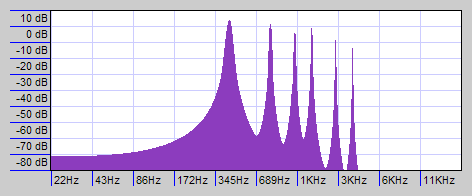
Spectrum of a 440Hz tone with registration 00 8767 054
The peaks and their amplitudes are:
| Frequency | Harmonic | Amplitude | Relative Amplitude |
Drawbar Setting |
|---|---|---|---|---|
| 440 Hz | Fundamental | 4dB | 0dB | 8 |
| 880 Hz | 2nd | 1dB | -3dB | 7 |
| 1320 Hz | 3rd | -2dB | -6dB | 6 |
| 1760 Hz | 4th | 1dB | -3dB | 7 |
| 2200 Hz | 5th | -88dB | -92dB | 0 |
| 2640 Hz | 6th | -5dB | -9dB | 5 |
| 3520 Hz | 8th | -8dB | -12dB | 4 |
If we now arbitrarily equate 0dB to a drawbar setting of 8, then every 3dB down from that corresponds to one drawbar increment down (anything -24dB or below becomes zero). One can see that the frequency spectrum of the tone corresponds exactly to the drawbar setting that produced it.
One can take advantage of this to derive a drawbar setting for an arbitrary tone. Starting with a recorded sample of the tone, use a tool like Audacity to generate a spectrum analysis, and write down the intensity of each peak. Equate the highest intensity to a setting of 8 and determine the settings of the remaining drawbars relative to that, so that each 3dB down from the highest corresponds to one drawbar increment down.
This technique works for almost any steady tone that one can get a recording of. For example, I found this short clip on www.freesound.org of a female vocalist singing melisma style. Here is the frequency spectrum from the second G# note in the performance:
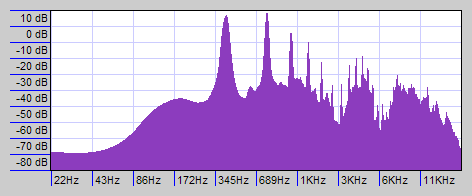
Spectrum of a female vocalist singing G# melisma style.
The peaks and their amplitudes, and the corresponding drawbar settings, are:
| Frequency | Harmonic | Amplitude | Relative Amplitude |
Drawbar Setting |
|---|---|---|---|---|
| 415 Hz | Fundamental | 9dB | -2dB | 7 |
| 831 Hz | 2nd | 11dB | 0dB | 8 |
| 1246 Hz | 3rd | 0dB | -11dB | 4 |
| 1661 Hz | 4th | -5dB | -16dB | 3 |
| 2077 Hz | 5th | -19dB | -30dB | 0 |
| 2492 Hz | 6th | -31dB | -42dB | 0 |
| 3322 Hz | 8th | -18dB | -29dB | 0 |
The drawbar setting to match this singer’s voice as closely as possible is thus 00 7843 000. Here is a clip of the aforementioned G# as sung by the vocalist, followed by the same note played with this drawbar setting:
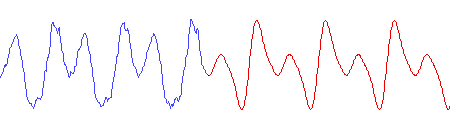
One second of a vocal G#, followed by one second on the Hammond. Click to play.
The graphic above shows both the singer’s waveform (blue), and the Hammond’s (red). The shapes aren’t exactly the same because the phase relationship between the harmonics isn’t the same, but research has shown that our hearing is insensitive to phase relationship. Also notice that in the singer’s waveform, there are additional small “jaggies”. These are from the higher harmonics that the Hammond cannot produce.
Here is another spectrum plot, comparing the spectra of the vocalist with that of the Hammond imitation. The purple areas are where the spectra coincide. Notice that all the higher harmonics are missing from the Hammond tone, as is all the non-harmonic content of the actual singer’s voice:
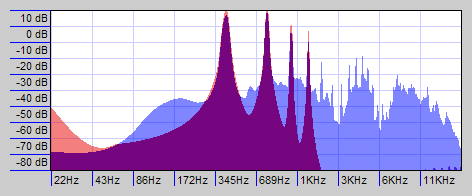
Comparative spectrum of vocalist (blue) and Hammond (red).
Hammond Shortcomings
Although a Hammond organ can reproduce many pipe organ stops, pipe organ registrations, and arbitrary sounds quite well, it falls short in some respects. Some of the shortcomings are:
-
If you create a drawbar setting for a pipe organ stop, it can often sound very much like the real thing. But if you create a setting for a combination of stops (a registration), it may not sound as full as the actual organ. When multiple ranks of pipes play at once, they will never be perfectly in tune with one another. On the Hammond however, the harmonics for all the stops are being produced by the same tonewheels, so it will sound as if the pipes were exactly in tune. The result might be too perfect to sound realistic.
-
The Hammond drawbars only give you up to the 8th harmonic, omitting the 7th. Sounds that contain significant portions of 7th harmonic or harmonics beyond the 8th will be lacking when reproduced on the Hammond. Additional harmonics are available on some models. For example, the spinet models provide a combined 10th/12th harmonic drawbar on the lower manual, and the H-100 series provide both 7th/9th and 10th/12th drawbars.
-
When more than one note is played, the same tonewheel might be contributing different harmonics to different notes. In theory, that tonewheel’s contribution will sound proportionally louder, but in practice, it will not be quite as loud as expected due to resistive losses in the magnetic pickup.
-
There’s more to timbre than the character of the tone. The envelope is also important. For example, a Hammond organ can be set to play approximately the same harmonics as a piano, but it will never sound like a piano. Piano notes have a sudden but not instantaneous attack followed by a gradual decay. Hammond notes have a nearly instantaneous attack (complete with key click), followed by steady volume, followed by an instantaneous decay.
References
Dictionary of Hammond Organ Stops – A Translation of Pipe Organ Stops Into Hammond-Organ Number Arrangements, by Stevens Irwin, 1939, 1952, 1961, and 1970.
A Primer of Organ Registration, by Gordon Balch Nevin, 1920. A copy of this book is available on-line at Scribd.com.
A Case Study: Tonewheels, by John Savard, 2010, 2012. This page goes into the workings of Hammond tonewheels in great detail, and is highly recommended reading for the technically inclined Hammond enthusiast.


Related Articles
If you've found this article useful, you may also be interested in:

If you've found this article useful, consider leaving a donation in Stefan's memory to help support stefanv.com
Disclaimer: Although every effort has been made to ensure accuracy and reliability, the information on this web page is presented without warranty of any kind, and Stefan Vorkoetter assumes no liability for direct or consequential damages caused by its use. It is up to you, the reader, to determine the suitability of, and assume responsibility for, the use of this information. Links to Amazon.com merchandise are provided in association with Amazon.com. Links to eBay searches are provided in association with the eBay partner network.
Copyright: All materials on this web site, including the text, images, and mark-up, are Copyright © 2026 by Stefan Vorkoetter unless otherwise noted. All rights reserved. Unauthorized duplication prohibited. You may link to this site or pages within it, but you may not link directly to images on this site, and you may not copy any material from this site to another web site or other publication without express written permission. You may make copies for your own personal use.
Brendon Wright
February 09, 2009
Good golly! My mind is spinning. I never figured these little beauties were so complex. So there’s more to it than just pulling out the four bottom drawbars then? I often wondered!
Cheers for that Stefan. Now I’m here I’ve got to see what other goodies are here. Once again, thanks. -Brendon.
Bill
May 21, 2009
A college professor said timbre was determined by the relative strength of harmonic or non-harmonic overtones. The transient (chaff), happening at the beginning of the sound, is also an aural identifier, as well as the amplitude envelope of a sound (ADSR). It "sounds" like the Hammond does a pretty good job of approximating the steady-state regime of oscillation within a sustained tone.
The proper balance of the drawbars reminds me of an experiment I did producing strong heterodyne frequencies on the electric guitar. I added distortion to create strong overtones (h1,h3,h5…for a square-wave) , then fed the sound of two strings playing together, in a close interval, through a variable band pass filter (wah). When the wah was tilted back or forward into the right spot, the amplitudes of the two strings were adjusted to a relative level which produced a very strong difference tone.
David Caron
January 06, 2011
I have been playing a Hammond for church and pleasure for 45 years. I never really understood how to combine registrations. I just did what sounded good. This article is very informative. Thanks for taking the time to write it.
John Savard
March 04, 2011
This is indeed the mathematically sound way to combine drawbar settings. However, I think it needs just one minor change. When the sum goes over 181, instead of dividing by the largest value and multiplying by 181, it would be better to multiply by 128. That way, “8” will be an accurate fit to the loudest component of the registration, instead of being too low by the maximum allowed error. (Of course, one could look for an overall “best fit”, but that’s more complicated.)
Stefan Vorkoetter
March 09, 2011
Yes, multiplying by 128 might be better, since an error in the loudest drawbar is likely to be more noticeable than an error in one of the others.
la
June 18, 2011
Too much commentary and analysis. The Hammond is what it is, has it’s own sound. I don’t expect it to duplicate a pipe or voice. Nothing else sounds like a Hammond, it’s immediately recognizable. Funny how all of a sudden it’s sound is gaining on the steel guitar in country music.
Dewkins Decker Chiao
June 24, 2011
more learning, more fun!!! wahaha…
Algin Porteria Bane
June 25, 2011
ok
Mark Christian Labro
July 13, 2011
i like hammond
Ken Damaso
August 16, 2011
i like hammong
Pat Saxon
August 18, 2011
The Hammond organ or moreless the drawbar organ is the only organ selling in America as the traditional organ with stop tablets is fading away from our culture. Many churches has replaced their classical orans for grand pianos due to the lack of organist in the USA. AGO is struggling to keep the traditional organ alive as the only organ selling is the Hammond or drawbar organ. The classical organ may become the thing of the past.
Stefan Vorkoetter
August 22, 2011
Pat, I agree that organists are a dying breed, but why do you say that drawbar organs are the only ones selling? Lowrey makes a line of organs with traditional stops, and so do companies like Allan and Rodgers.
Eugin Magbanua
September 04, 2011
can i have some brilliant drwbar settings????hahahaha….pls send me some…..thanks….
Jhopet Bustillos Abejon
September 14, 2011
i am just learning how to bring out the best of xk-3.
Julie Ann Samson
December 28, 2011
This is very interesting… but it really takes time to understand this. can anybody give me or post their own registrations here? I want to hear new combinations… thanks..
mustafa kutlu
March 06, 2012
yaa ben orjinal hamond sesinin draw barayarını istiyorum
Ray
January 16, 2016
Fascinating article, Stefan. Thank you very much.
I’m trying to understand the math concerning how much volume comes out of a single tone wheel depending on keys played and the current drawbar setting.
Let’s say that my drawbars are set to 008800000 and I play a C. I understand that it will sound on two tone wheels. But what happens when I play a C and the C an octave above it? 3 tone wheels are required one one of them will be used by both notes. How does that change the volume coming from that tone wheel? Is it doubled? And then, how does that scale up as more and keys (and drawbars) ask for more from that tone wheel?
And what happens when using a setting like 008400000 where both notes use the same tone wheel again but one wants the volume at full and the other at half? Does the louder volume win? Or is it something 1.5x louder?
Thanks again!
Stefan Vorkoetter
January 16, 2016
Ray, the short answer is that there is no simple answer. The resulting volume (in the “88” case) will be more than just 1x the single-key volume, but less than 2x the single key volume. The generator for each tone has a resistance inherent to the coil. The generators are also connected to the keys via resistance wires. So to figure out the volume from a given tonewheel that finally makes it to the amplifier requires that you calculate the current flowing through each path. In the case of two keys using the tonewheel at once, the resistance of the coil is common to both paths, but then the current splits and flows through two different resistance wires to the keys, and from there into the mixing transformer (which also has an inherent resistance). If the two drawbars involved are not both set to the same amount, then the two tones flow into different taps of the transformer, and thus see a different resistance in the transformer. On the console Hammonds, this is further complicated by the resistance wires not all having the same resistance (this is known as tapering), so it depends on which two keys you play as well. It is of course possible to calculate what the volume from a given tonewheel will be in any given case, but it would be rather time consuming to do so.
Ray
January 17, 2016
Thanks for your reply, Stefan. I can see that to try to calculate the voltage paths can be incredibly complicated. So I wonder if a reverse engineering solution would be worth anything. Something like: setup the “88” registration, recording one key down, and then recording several key down combinations that would use the same tone wheels and finally looking at the waveform to calculate how much each key/tonewheel contributed to the one. Hmmm…
Stefan Vorkoetter
January 17, 2016
Well, doing what you suggest, and if you were mathematically inclined, you’d end up with a set of simultaneous equations that you can solve to determine what’s actually going on. Of course the other way to do it is to measure the generator impedances, look up the values of the resistance wires (there are table in various places on-line), and measure the mixing transformer impedances. Then you’d know exactly what’s happening. Are you trying to develop a clonewheel? Hardware or software?
Ray
January 17, 2016
Yes, I’m working on a software clone and at the moment, this is my biggest question mark (among many others…lol). At this point, my best guess is that each note on adds somewhere between 0 and 1x more output to any tonewheel (scaled by the drawbar setting which is non-linear as well), although it seems doubtful that it’s a linear doubling. One thing I’ve noticed is that if you play a large number of keys on a real Hammond, it doesn’t seem proportionally louder, but bad clone wheels are proportionally louder, so there’s some kind of natural compression going on in the real machine, and I’m pretty sure that this (unknown) algorithm is at the heart of it. Thanks for your input. Feel free to email me off list. Cheers.
Steve
April 03, 2016
Do not forget that the impedance in the coil changes as the high side of the wheel passes the pickup (dwell). There is a lot more to the Hammond, than meets the eye, Just like the computer. Hammond had an few extra intelligent brain cells from somewhere. All things are there we just have to find them.
Jeff
August 19, 2016
Stefan!
Loved your drawbar calculator! Great info here!
Quick question: What’s your input on the direct analogue keying vs. MIDI note on note off debate? Do you think there’s any difference (other than the way a player perceives it as he’s playing)?
Stefan Vorkoetter
August 19, 2016
If we’re only talking about Hammond organs, then there’s a world of difference. For one thing, direct analog keying causes keyclick, as notes are switched on an off in mid-cycle. Secondly, the various harmonics don’t all turn on an off simultaneously, since there’s a separate key-contact for each one, and their relative alignment is never perfect. If you push down a Hammond key very slowly, with all the drawbars pulled out, you will hear each harmonic enter the mix at a different time. Likewise, when you release the key, the harmonics each stop sounding at slightly different times. A good player (not me) can use this to affect the attack and release characteristics of the sound; press the key quickly and the note starts crisply, press it slowly and it starts with a chirp. Yes, I suppose you could fake all that with a velocity sensitive MIDI keyboard and a sufficiently accurate simulation of a tonewheel generator, but I’m not sure anyone does. Then of course there’s the MIDI latency, which direct analog keying does not suffer from.
Jim McLay
February 07, 2017
I wouldn’t mind getting my hands on the waveform produced by the so-called “classic” 888000000 Hammond setting. I’ve got a sinewave look-up table waiting to be modified.
Cheers
Jim McLay
February 12, 2017
I tracked down a Hammond to a store in Crok, Ireland. Ended up with a very nice 60’s-style tone by playing around with the drawbar settings in a controlled fashion.
Steven Vien
May 04, 2017
Stefan: I just bought a ’70s C 3 and Leslie 122 and I’m looking for the combination of stop bars that will give me the ’70s progressive rock nasty grind heard on records like “the Yes Album”, ELP’s Tarkus, Quatermass, etc., and I’m too old to screw around looking for that combination, assuming I have the equipment necessary to get there. If a larger amplifier is needed with some distortion, l have quite a few ’70’s guitar amplifiers that I can distort by turning them up or adding gain, if necessary, but I was hoping that tone could be recreated with the organ and the 122, as I’d like to seep the volume down if possible. Do you know what sound I’m talking about, and is it possible. Either way, you deserve a cup of coffee on me.
Thanks, Steve Vien
Stefan Vorkoetter
May 04, 2017
I think that to get that sound, you need some distortion. To achieve that without cranking the volume on an external amp, you’ll probably want to install something like the ProfKon ZD-1. Years ago, the schematic for this was shared by Kon Zissis, the designer, and you may still find it floating around on-line if you want to build your own. Thanks for the coffee!
Lars Hamre
May 05, 2017
Sorry, but the steps on a drawbar are NOT all 3dB. At least not on any of the common tonewheel organs. For a typical matching transformer, the steps are roughly like this (position, level in dB, step in dB):
8 0.0 dB
7 -3.0 dB (8 to 7 is -3.0 dB)
6 -6.0 dB (7 to 6 is -3.0 db)
5 -10.5 dB (6 to 5 is -4.5 dB)
4 -15.2 dB (5 to 4 is -4.7 dB)
3 -20.0 dB (4 to 3 is -4.8 dB)
2 -26.1 dB (3 to 2 is -6.1 dB)
1 -32.1 dB (2 to 1 is -6.0 dB)
0 OFF
Stefan Vorkoetter
May 05, 2017
Thanks for this information Lars. I was not aware of that, and the common wisdom has been that they are 3dB steps. How did you determine these values? This certainly deserves more investigation, and could result in a different algorithm for combining settings. I also wonder if the clonewheels duplicate the step sizes?
Lars Hamre
May 05, 2017
It’s easy to determine what the values are as long as you have some kind of level meter that shows dB (rms/peak/analog/digital isn’t important). Pull out a single drawbar, then go through the steps and note down the values. You could even do it on the frequency spectrum graph you show on this page, if it’s possible to zoom in a bit closer.
How all those people have managed to come up with those methods but not actually measured the values is… odd 🙂
Maybe all the steps are closer to 3 dB in models where the drawbars use resistors to change the level (like the L100), instead of the matching transformer windings (A100, B3, etc), but those are not the popular models, and I have never measured them.
I use the values above in Viscount Legend, although converted to a smooth drawbar curve and not 8 steps.
Stefan Vorkoetter
May 06, 2017
Thanks. I will measure my M-111 when I get an opportunity.
Edward Grabczewski
March 18, 2018
This is a very complete, comprehensive and satisfying article on the relationship of drawbars to real spectra. You’ve managed to put into words what I sensed about the way these things should be understood. I’m also grateful for clarifying the debate about Steven Irwin’s registration combinations. Maurice Grudin in “The Well Timbred Hammond Organ” also had a technique for combining stops but it’s good to know that Porter Heaps, an experienced organist, came closest to your system, with a methodology that’s simpler to apply than the mathematics of your own system. More of a rule of thumb for those in the field.
Josef Janda
July 27, 2019
I’m thinking about writing a simple android app using your algorithm. Could you please give me your comment on possibly publishing it? I can give you more info on the email. Thanks.
Stefan Vorkoetter
August 10, 2019
Hi Josef: I sent you an e-mail a few days ago, but did not hear back. Did you receive it?
Ziya Mete Demircan
October 31, 2019
Simpler way (same result):
If the values are equal or the difference between two numbers in the same column is 1, add +1 to the big one. Otherwise accept the big one.
example:
012345678
011223344
=__________
023445678
Stefan Vorkoetter
October 31, 2019
It may be the same for combining two settings, but it won’t always be for combining three or more.
Stefan M
June 08, 2020
Hi, sehr interessant, ich bin auf der Suche einer App mit der ich die Registrierung einer Orgel aus einem Song herausfinden kann. Gibt es sowas? LG Stefan
Stefan Vorkoetter
June 08, 2020
It’s a good idea, but I don’t know of any such app. The problem for the app would be to separate the organ tone from everything else. Even doing this manually (using Audacity and a spectrum analysis) is difficult due to all the other sounds in a song.
Urs Meyer
January 01, 2021
Good morning, and happy New Year!
I stumbled over your homepage and found it really inspiring. Thank You!
Most theories I find on tonewheels put the focus on additive synthesis.
On tuning a tonewheel to my taste, I found this not much helpful.
1) Regarding the sound that is generated, the distortion created by the speaker system may not be neglected. Linear distortion.
2) On playing two neighboring keys together, non linear distortion appears significantly. This effect is inherent in tube amplifiers.
The conclusion is: For evaluating and tuning a tonewheel organ, the experimental method with sine/square generator and oscilloscope and FFT is indispensable.
I see you like aviation. My contribution: https://www.youtube.com/watch?v=fuQq_ny2EHY.
Have a fine day!
Urs
O8h7w
November 22, 2024
Thankyou Stefan,
as an engineer trying to learn organs this was very helpful. But it has me dreaming of a modernized incarnation, a fader organ… 🙂
– motorized faders
– with labels corresponding to both dB attenuation and traditional drawbar levels
– can combine settings correctly for you
– optionally combine with detunes (for emulating organs other than tonewheels)
– a few more harmonics
– keyclick optional (on both start and stop)
– limited options for envelope: perfectly rectangular, emulating all types of organs (this cannot be more flexible or we leave organ territory entering synth territory)
I could certainly code such a thing if I gave it enough time, but that would be a LOT of time, as I haven’t coded anything like it before. Dreams. Why are they so hard to realize?